
Why it makes sense to start with repetitive tasks
When a company wants to start automating, it does not always make sense to begin with the most visible or impressive use case. Very often, the best starting point is much simpler: identify the tasks that repeat every day, consume too much time, and add little differentiated value when done manually.
These tasks usually share three traits: they happen frequently, they follow a fairly clear logic, and they create operational friction when they pile up. That is exactly why they are good candidates to start with. Not because they look impressive, but because they allow you to generate learning and return without deploying a huge project from day one.

If the goal is to save time, reduce errors, and free up capacity for higher-value work, these five areas are usually a far better starting point than a generic AI experiment.
1. Email triage and internal requests
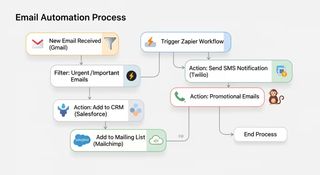
Many teams lose an enormous amount of time on work that looks small but repeats constantly: reading emails, classifying them, forwarding them, requesting context, and making sure every request ends up in the right place.
Automating this layer does not mean “replying to everything automatically.” In many cases, value appears simply when a system helps detect the type of request, assign it to a category, send it to the right channel, or prepare a first response with the basic information.
This is especially useful in environments where many internal requests, manual tickets, or fragmented follow-ups arrive through email, chat, and management tools. The result is usually twofold: less administrative time and less operational noise.
2. Data entry and validation across tools
Another very common source of friction is manual data entry. It happens when someone receives information from a form, an email, a spreadsheet, or an application and has to copy it into another tool so the process can continue.
This kind of work does not just consume time; it also creates duplicates, transcription errors, and inconsistency between systems. When there is a clear transformation or validation logic, automation here often produces a fast return.
It can apply, for example, to contact records, commercial follow-up, updating administrative fields, consolidating data, or preparing internal reports. It is not the most visible part of a project, but it is one of the areas that saves the most time when done well.

3. Preparing documents, drafts, and summaries
There are many tasks that cannot be delegated completely, but can be accelerated significantly. Preparing a draft, summarizing scattered information, structuring a document, or leaving a first version ready for review are all common examples.
Here, the value of automation or AI is not in deciding for the team, but in reducing preparation time and improving consistency. A strong first draft, an initial checklist, or a summary of key points can save a great deal of work when it later goes through human validation.
This tends to work especially well in quality, operations, internal support, or administrative contexts where documents repeat and follow a recognizable structure.
4. Administrative and commercial follow-up
Follow-up is another large bucket of repetitive work: remembering appointments, checking whether documentation is missing, sending reminders, making a second contact, confirming receipt, or making sure an opportunity does not stall without anyone noticing.
When this follow-up depends only on memory, email, and goodwill, it is easy to lose traceability. By contrast, when there is a well-designed automation in place, the system can trigger reminders, generate internal alerts, or move a process to the next stage when certain conditions are met.
It may not look like a major revolution, but this is precisely where many organizations recover order and consistency. And that has a very real impact on both internal efficiency and the experience of clients and teams.

5. Internal support for procedures and knowledge
When questions like “where is this document?”, “which version is the right one?”, or “how is this step actually done?” keep repeating inside the organization, there is a clear opportunity to improve. Not so much to replace people, but to reduce search time and avoid inconsistent answers.
A tightly scoped internal assistant with clear sources and simple response rules can help a lot here. This is especially true in environments with SOPs, internal procedures, quality systems, or operational documentation. The value becomes obvious when people stop depending on asking the same person every time they need to resolve a recurring doubt.
It is also a very good way to start using AI with judgment: sources, validation, limits, and clear cases where the system should ask for context or say no.
How to prioritize where to start
There is no need to automate all five of these areas at once. In fact, it is better not to. Priority usually sits where three factors overlap: high repetition, clear operational impact, and a process that is understandable enough to be scoped properly.
That is why, before building anything, it helps to ask simple questions: which task consumes the most time each week, which one creates the most errors or rework, which one depends too heavily on manual follow-up, and which one has enough volume for an improvement to be noticeable if solved well.
This filter is usually much more useful than starting with tools. When the task is well chosen, the technology is chosen much better too.
If you want to turn that choice into a more concrete decision framework, you can continue with this guide on how to choose your first AI pilot without losing months.

Conclusion: less generic promise, more operational gain
If you want to start automating, repetitive tasks are a very strong entry point because they allow you to see real value without needing a major transformation upfront.
What matters most is not finding the most impressive task, but the one that best combines volume, repetition, and impact. When that is identified well, the result is not only time savings: it also means fewer errors, more consistency, and more capacity to dedicate the team to work that genuinely requires judgment.
If you want to apply this to your context, you can see how we work in services, explore solution families, or go directly to contact to assess which first automation would make the most sense in your case.
References and context. This article has been reframed using information and frameworks published by McKinsey & Company, Harvard Business Review, Harvard Business Review, Make, and Salesforce. External sources are used as market context; the prioritization and implementation lens reflects the project’s current positioning and operating criteria.