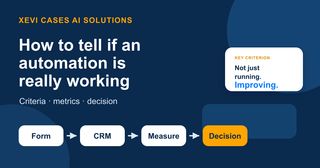
An automation is not working just because it runs
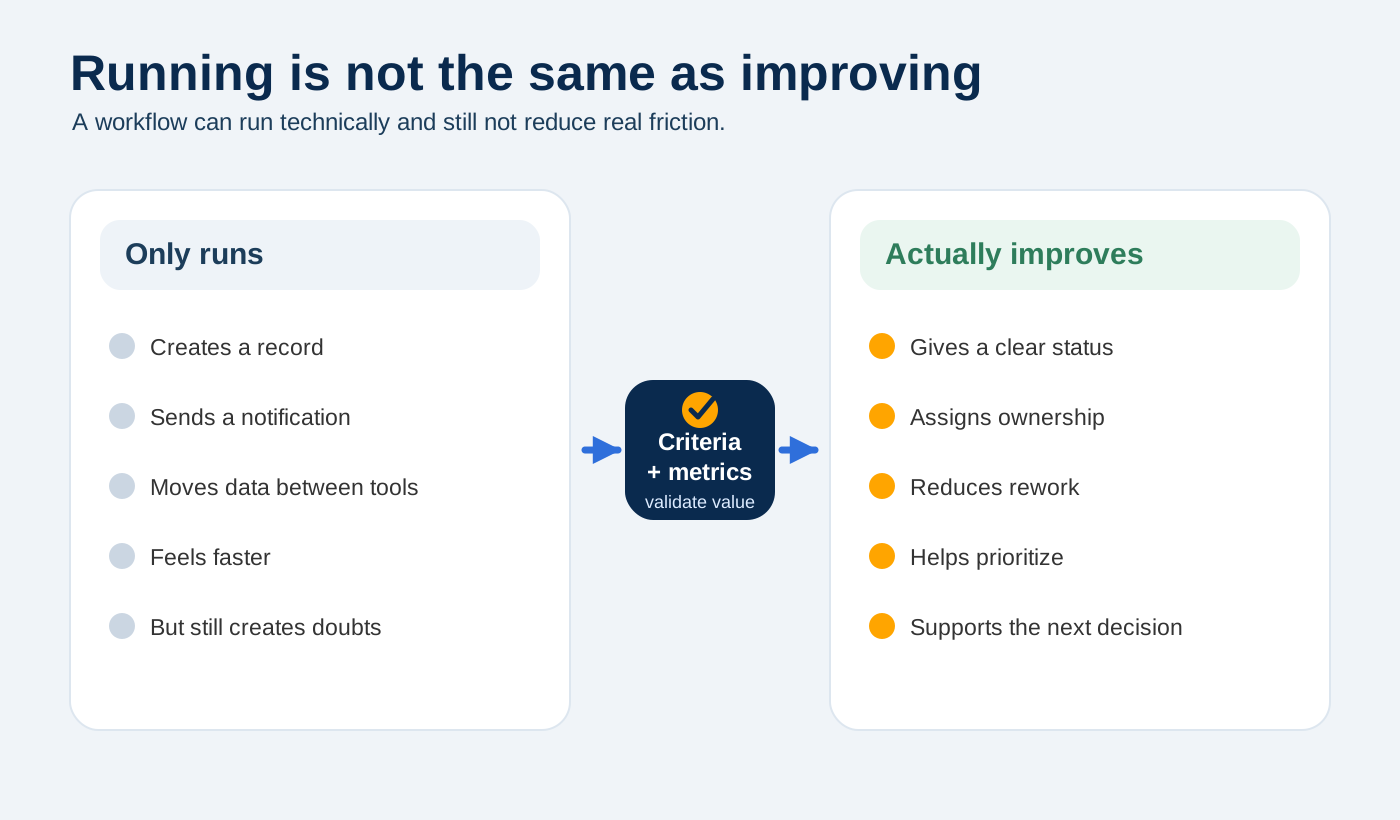
On paper, the workflow exists. In practice, it may have only moved the mess from one place to another.
This happens more often than it seems. The form sends data, the CRM creates a record, a notification arrives, and the demo looks good. But a few weeks later, the team is still asking who replied to that contact, correcting incomplete fields, or looking in another channel to understand the next step.
The technical part may be working, and the process may still not have improved much.
That is why I do not like evaluating automation with a simple “it works” or “it does not work”. It is too weak a question. The useful question is different: what has changed in the team’s day-to-day work, and how can we see it?
If you are still deciding which case to test, this guide on how to choose your first AI pilot without losing months can help you narrow down the starting point. Here we go one step further: once an automation or pilot is already running, how do you decide whether it is worth continuing, adjusting, or stopping?
“It seems to work” is not a metric
When an automation is new, it is normal to look at it positively. It does things that were previously manual, responds faster, seems more organized, and creates a sense of progress.
But the important friction almost never appears on day one. It appears when volume increases, when an exception comes in, when a piece of information is missing, or when someone who was not in the design meetings has to use the system.
Think of a very common case: a web form, a CRM record, and a notification to the team. In theory, it is simple. Someone fills out the form, the contact is created, and the team receives an alert. Up to that point, the process makes sense.
The problem appears afterwards. The contact comes in with information that is too open-ended. Someone has to read it and interpret whether it is an opportunity, a question, an issue, or a request that does not fit. The CRM has the record, but it is not always clear what state it is in. And when the weekly meeting comes around, the same question appears again: “has anyone replied to this?”.
At that point, automation has not removed the friction. It has only moved it forward faster.
This is where having a clear criterion actually matters. Not to make things more sophisticated, but to put the basics in better order. First understand the process, then automate it, and only add AI where it genuinely helps people make better decisions.
Before building, look at how the team works today
The most honest way to evaluate an automation is to take a snapshot of the process before changing it.
This does not need to become an endless study. But you do need to look closely at what happens today. In a commercial or operational form, it is often enough to observe three things: how long the team takes to respond, how much information arrives wrong or incomplete, and how many cases remain in a grey area with no clear status.
This moment is often uncomfortable because it shows that the problem was not only technological. Maybe the form asks for too little. Maybe the categories are not useful for making decisions. Maybe the CRM is full of records, but no one trusts it because for months it has been used as a storage box rather than a follow-up tool.
And that is exactly why it is useful to look before you build.
If you do not take that initial snapshot, it becomes very easy to argue based on feelings. One person will say everything is faster now. Another will say there is still too much correction work. And both may be partly right. Without a point of comparison, it is hard to decide.
Before adding AI to summarize, classify, or prioritize contacts, I would want to know something much simpler: is the basic process ordered enough for the team to trust it?
Three metric blocks that actually help
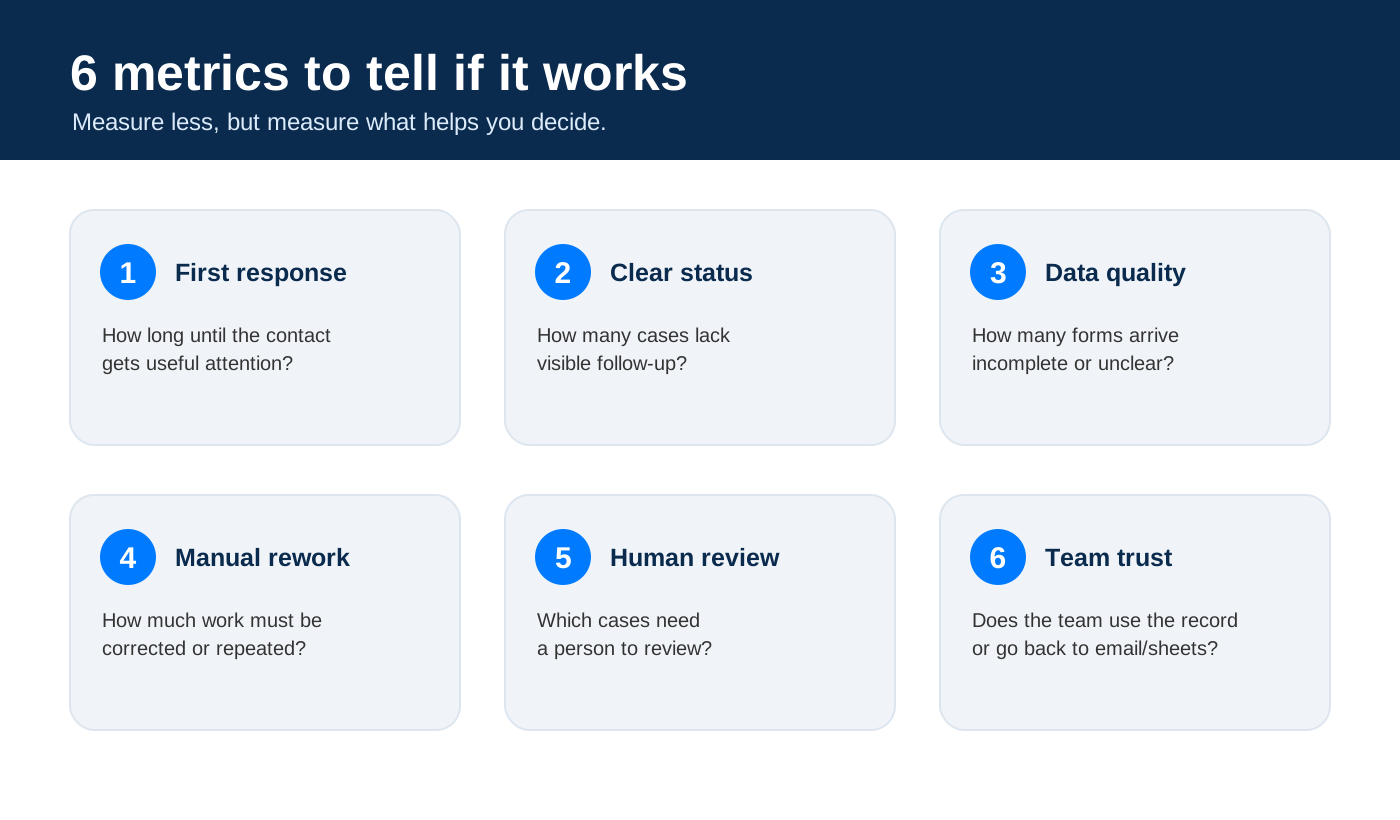
I would not track ten indicators or build a dashboard just to justify the pilot. In an early phase, I would focus on three metric blocks. They are simple enough to measure without overcomplicating the project, and useful enough to support a decision.
1. Speed and traceability
The first block is obvious: time to first response. If a contact used to wait a full day and now the team sees it within two hours, something has improved.
But speed alone can be misleading. You also need to know whether that contact ends up in a state people understand. “It was created in the CRM” is not the same as “we know who owns it, where it stands, and what needs to happen next”.
I have seen processes where the record was created perfectly, but no one knew whether it was pending, assigned, answered, or discarded. Technically, the workflow was running. Operationally, there was still too much fog.
That is why I would measure them together: response time and clear status. If automation speeds up intake but does not improve traceability, you have only gained speed to get lost sooner.
2. Data quality and rework
The second block is less flashy, but it often explains whether an automation is truly helping.
If the form comes in with incomplete information, overly open fields, or categories that are not useful, the team will still have to correct, complete, or reinterpret the request. And that is work, even if the record was created automatically.
This is where many automations look good from the outside and weak from the inside. They have removed one manual step, but left behind a cleanup task that no one counts. Time is no longer lost copying data, but it is lost fixing it.
That is why I would look at how many forms come in with data good enough to act on, and how much manual rework remains afterwards. If that does not improve, maybe the problem is not the CRM or the AI. Maybe the form, the required fields, or the classification logic needs to change.
Sometimes the best automation starts by removing a bad question from a form, not by adding an AI model.
3. Human review and trust
The third block is often left until the end, but for me it is central.
When AI is involved, I am not only interested in whether it classifies well. I want to know when it hesitates, when it asks for more information, and when it sends the case to human review. A system that always answers confidently may feel convenient, but it can be risky if it does not recognize its limits.
In a form workflow, AI can summarize the request, detect a possible priority, or suggest a next step. But it should not decide alone when context is missing, when there is risk, or when the classification is unclear.
That is why I would measure how many cases require human review and why. I do not see this as an error. In many pilots, it is actually a good sign: it means the system is not pretending to know everything.
And then there is a metric that is less numerical, but very real: team trust. If the team does not trust the CRM, the record, or the AI output, it will go back to email, chat, or a parallel spreadsheet. When that happens, automation stops being the system of work. It becomes another layer.
Automation starts working for real when the team stops working around it.
A simple table can say more than a huge dashboard
You do not need to start with a large dashboard. In a first test, a simple table over two or four weeks can create a more useful conversation than a dashboard full of charts nobody knows how to interpret.
For example:
| Metric | Before | Possible after | What it tells us | Decision |
|---|---|---|---|---|
| Time to first response | 24 h | 2 h | The contact gets attention sooner and the risk of losing opportunities drops | Keep and review volume |
| Contacts with no clear status | 35% | 5% | Traceability improves and the team knows what is pending | Scale if stable |
| Forms with incomplete data | 40% | 15% | There is still room to improve, but manual rework decreases | Adjust fields and validations |
| Manual rework afterwards | High | Medium / low | The team spends less time correcting and interpreting information | Adjust data intake |
| Cases requiring human review | - | 20% | AI does not decide alone; it routes cases when context is missing or there is doubt | Keep limits |
| Team trust in the record | Low | Medium / high | The CRM or record becomes useful again, not just an incomplete storage space | Consolidate usage |
These are sample figures. They are not a promise of results. They show the type of reading that helps you decide.
The important part is not that every indicator improves at once. That almost never happens. Maybe response time improves a lot, but there is still too much incomplete data. Maybe rework decreases, but the team still does not update statuses properly. Maybe AI summarizes well, but routes too many cases to review because the form does not provide enough context.
All of that is not noise. It is the material you need to decide the next step.
Where AI belongs, and where it does not need to enter
AI can create value in this type of process, but it should not be the first answer to every problem.
If the form is confusing, AI will not magically fix the process. It may help interpret some entries better, but it will still be working on a weak foundation. If the CRM has no clear statuses, AI may write a very good summary and the team may still not know what to do next.
I would frame it like this: first, put the minimum order in place. What data do you need? What initial status will each contact receive? Who gets the alert? What happens when information is missing? When should a person step in?
Once that is clear, AI can help. It can summarize the form so the team does not have to read everything from scratch. It can classify the request with a first hypothesis. It can detect that an important piece of information is missing. It can suggest a next step. And, above all, it can flag the cases where it should not invent an answer.
That last part matters. Useful AI is not AI that always answers. It is AI that knows when it does not have enough.
When can we say it is working?
For me, automation starts working when it stops being “the new system” and becomes simply the normal way of working.
That does not mean it is perfect. It means the team no longer needs to invent shortcuts to compensate for it. The data is good enough to make decisions, pending cases are visible without having to ask three times, and exceptions do not force people back into the old process.
There is a very simple test: if after a few weeks the team is still managing the process in a parallel spreadsheet or asking everything in chat, something did not fit. Maybe the workflow is too rigid. Maybe the record is not useful enough. Maybe the system requires too much work to keep it clean.
That does not always mean the pilot is bad. Often, it means you have not yet found the right shape. And that information is far more useful than a demo that works but no one ends up adopting.
Scale, adjust, or stop
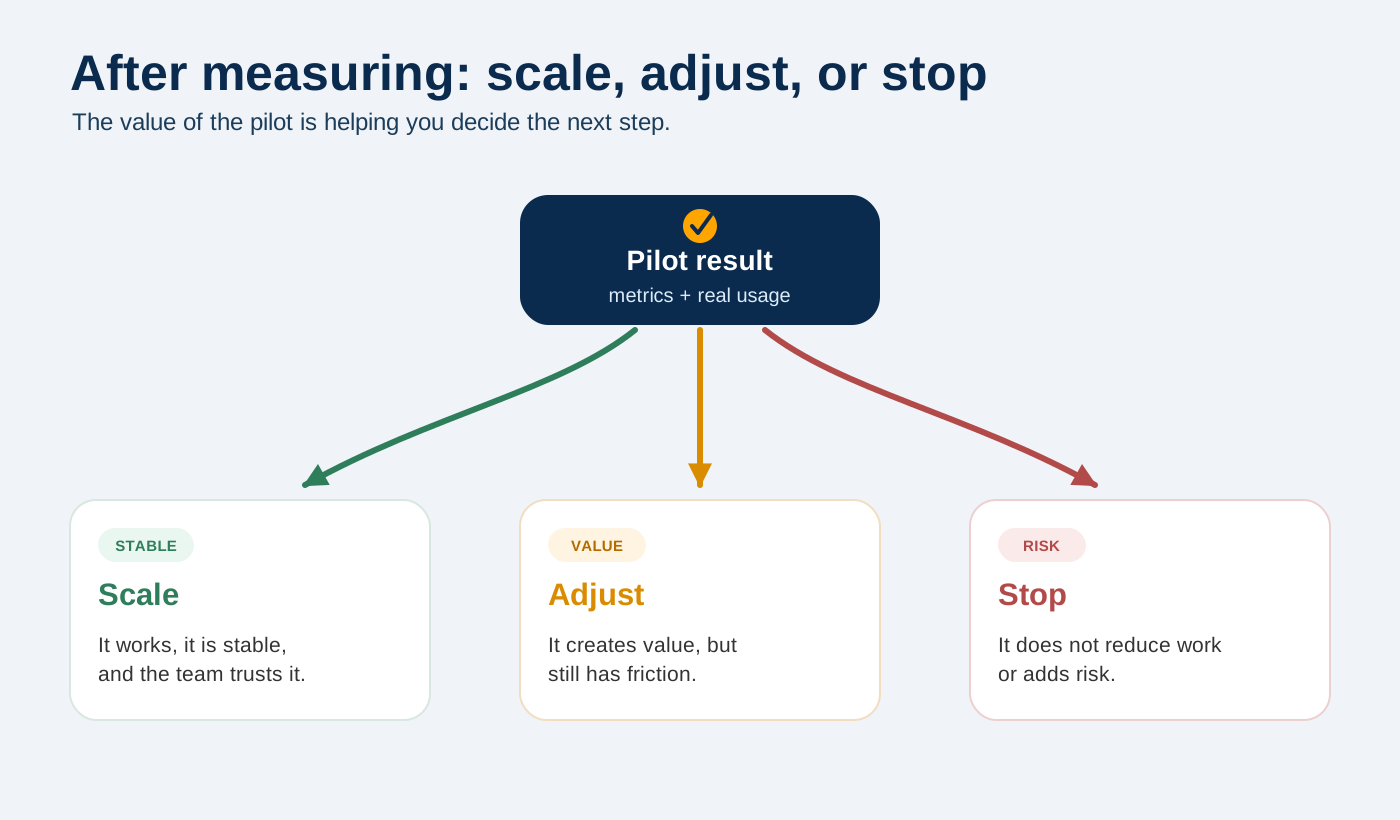
The outcome of a pilot should not be just “we like it” or “we do not like it”. It should help you make one of three decisions.
| Result | Decision |
|---|---|
| It works, it is stable, and the team trusts it | Scale |
| It creates value but still has friction | Adjust |
| It does not reduce work or adds risk | Stop or rethink |
Scaling may mean opening the workflow to another form, another team, or another part of the process. You do not need to roll it out across the whole company just because the first test went well.
Adjusting is probably the most common result of a good pilot. Maybe fields need to change, categories need to be refined, notifications need to be simplified, or the team needs a clearer rule for what happens when information is missing. That is not failure; it is learning with a small enough piece that it is still easy to correct.
And stopping can also be a good decision.
Sometimes the best outcome of a pilot is discovering that this part should not be automated yet. It may sound like bad news, but it is the opposite: it saves you from building a nice-looking solution on top of a process that still cannot support it.
If you want to go deeper into this, this article on common process automation mistakes may also help, because many problems appear precisely when teams scale before validating the process properly.
A minimal template to review your case
You can adapt this table to your process before starting a pilot or during the first few weeks.
| Metric | Before | After | Observation | Decision |
|---|---|---|---|---|
| Time per task or response | ||||
| Volume handled | ||||
| Errors or omissions | ||||
| Manual rework | ||||
| Cases with human review | ||||
| Real usage by the team | ||||
| Trust in the record or system |
You do not need to fill it in with scientific precision. But you do need enough judgment to stop arguing only from impressions.
Measurement is not there to prove the automation was good. It is there to help you decide better.
Automating well means deciding better
There is an idea that is hard to accept when you are eager to move forward: sometimes, the best outcome of a pilot is discovering that it is not time to automate that part yet.
That is not a defeat. It is better to see it in a small test than to build an entire solution on top of a process that still cannot support it. If the data comes in badly, if no one knows which status is reliable, or if the team does not trust the record, adding more automation will only make the problem move faster.
That is why measurement matters. Not to prove that AI works, and not to justify a decision that had already been made, but to see what happens when the idea touches daily work.
Sometimes the answer will be to scale. Other times it will be to adjust fields, statuses, notifications, or criteria. And sometimes it will be to stop. That is also a good decision if it prevents you from investing in a weak foundation.
If you have a process that looks like a good candidate but you are not sure how to measure its impact, you can review the business process automation approach or start a conversation through contact. The first important decision is not which tool to use, but how we will know whether the work has actually improved.