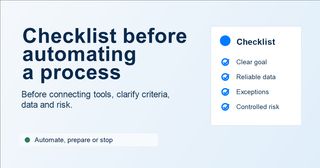
Not every time-consuming process is ready to be automated
There is a common temptation when a process feels heavy: find a tool, connect two apps, and try to make the work disappear.
Sometimes that works. But often, automation only speeds up a problem that was not yet well understood.
Think of a contact form that goes to the sales team. Before, someone read it, decided whether it was a real opportunity, and wrote down the next step. Now the form automatically creates a CRM record and sends a notification. It looks like a clear improvement. But if the “need” field is still too open-ended, if no one has defined what “high priority” means, and if the CRM was already full of unreliable statuses, all you have done is let the mess come in faster.
Automation is not always the first step. Often, before connecting anything, you need to understand the process well enough to know whether it can already run on its own.
If you are still deciding which case is worth testing, you can start with this guide on how to choose your first AI pilot without losing months. And if you already have a pilot running, this article on how to tell if an automation is really working may also help. Here we are one step earlier: deciding whether that process is ready to become part of a workflow.
A checklist is not bureaucracy. It is a way to avoid scaling the mess
When we talk about automation, a checklist may not sound exciting. It does not have the shine of an AI agent or the appeal of a live demo that works.
But it is exactly what prevents many problems.
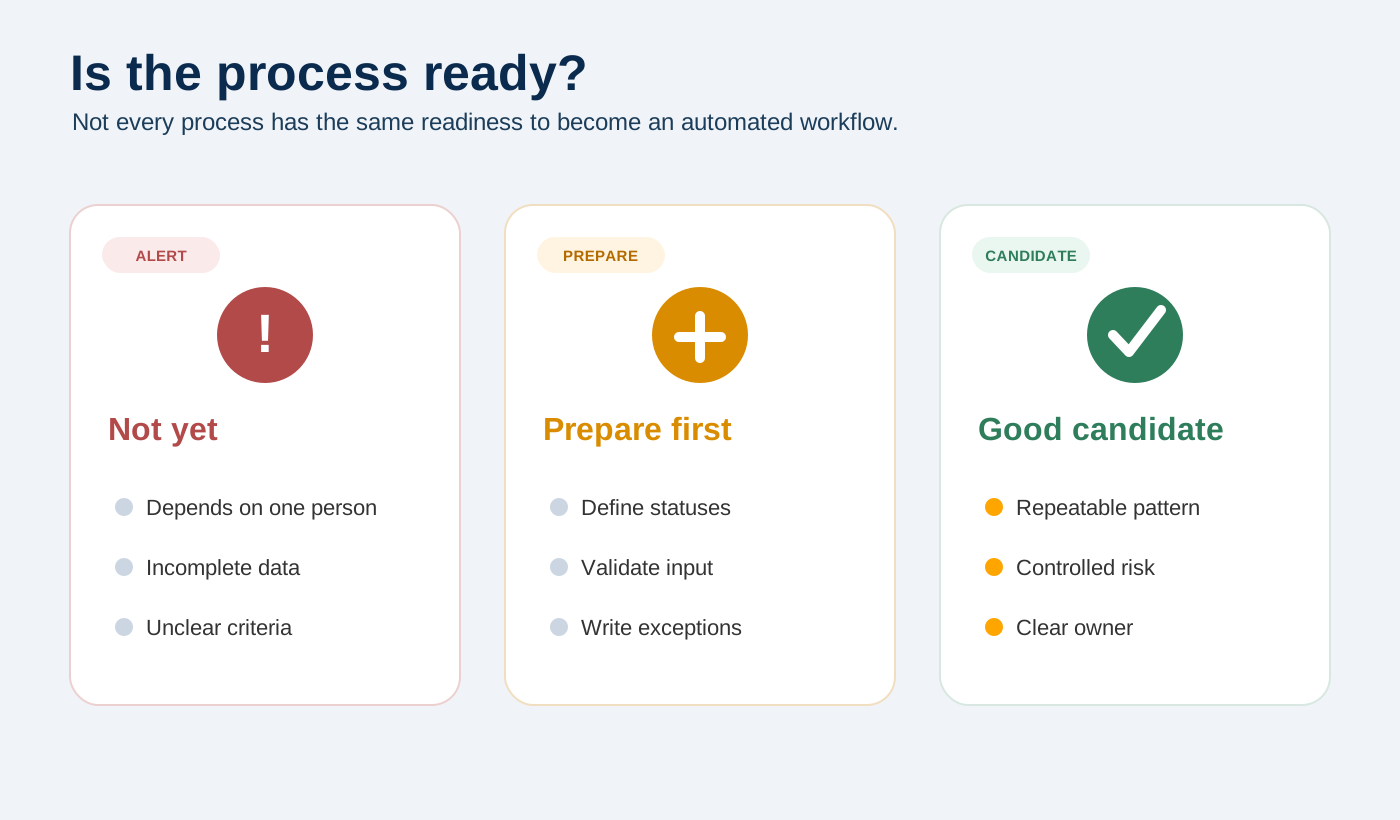
A good checklist is not there to slow the project down. It is there to show whether the process still has too many grey areas: incomplete data, exceptions solved by improvisation, decisions only one person understands, or records the team no longer trusts.
The question is not just “can we automate this?”. You can almost always automate something. The useful question is different: what happens when this process runs without a person checking every step?
That is where judgment starts.
1. What problem do you want to reduce exactly?
Before automating, you need to name the friction.
Maybe you want to reduce administrative time. Maybe you want to respond to leads sooner. Maybe the real problem is not time, but the fact that each person classifies requests differently. In that last case, connecting tools will not help much if the team has not agreed on the criteria first.
That difference matters because each problem calls for a different solution.
If the problem is volume, it may make sense to automate repetitive steps. If the data comes in badly, the first change may not be AI at all, but a better form. And if the team does not trust the system, adding more automation may make them use it even less.
A good first question would be this: if this process improved, what would we notice in day-to-day work?
Maybe the team stops wasting time on internal questions. Maybe errors go down or decisions become more consistent. That kind of answer is much more useful than saying “we want to automate the sales process” or “we want to add AI to support”.
2. Is the process repeatable enough?
Automation needs at least some pattern.
That does not mean everything has to be the same every time. Real processes have exceptions, incomplete cases, urgency, and human decisions. But you do need to be able to explain the usual path without relying only on the team’s memory.
If understanding the process always requires asking the same person because “she just knows how it works”, you do not yet have an automatable process. You have knowledge that lives in someone’s head, not in a document. It can be valuable, but before putting it into a workflow, you need to make it visible.
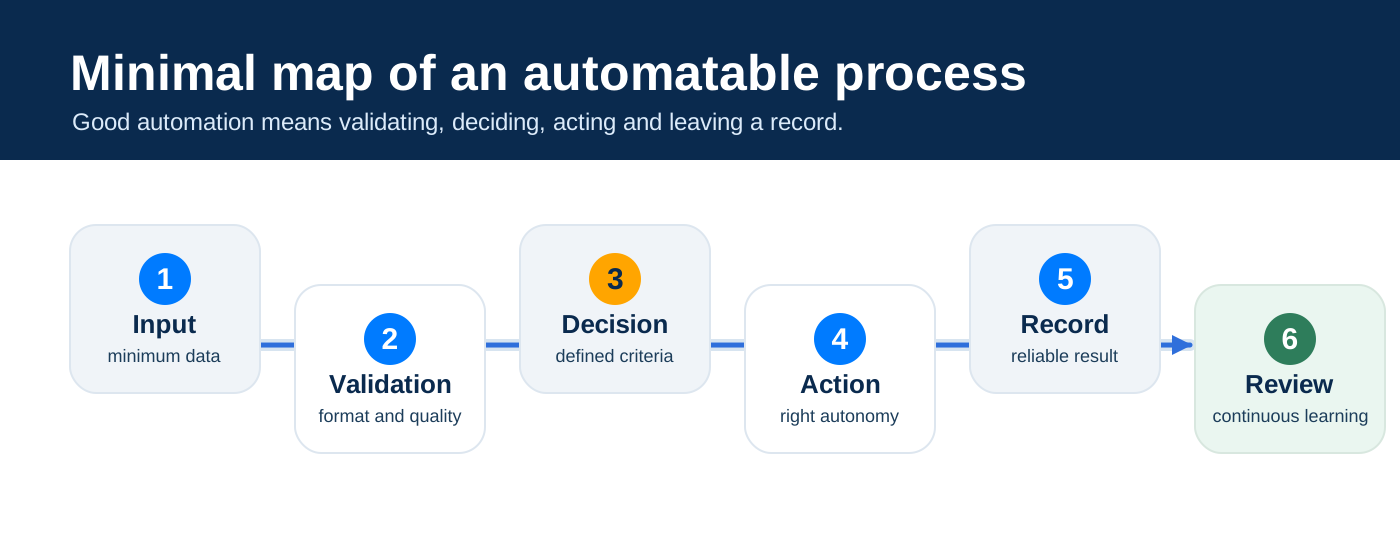
A good test is to try to write the process in five or six steps:
- What triggers the process?
- What data comes in?
- Who or what validates that it is correct?
- What decision needs to be made?
- What action happens next?
- Where is the result recorded?
If you cannot write that outline, you already have your first task: put the process in order before automating it.
3. Is the input data reliable enough?
Many automations fail before they even start because the input is already poor.
An empty field, a category that is too open, text that is hard to interpret, or data with no clear format can make the whole workflow act on a weak foundation. And when that happens, automation does not remove work. It moves it to the end of the process.
Someone will still have to correct, complete, or reinterpret what the system processed too quickly.
That is why, before connecting tools, it is worth reviewing which data is required, what format it should have, and what happens when it arrives incomplete. It is also worth asking whether some fields look useful but are never actually used to make decisions.
Sometimes the most important improvement is not automating the final action, but validating the input better.
A process with weak data may look automated from the outside, but inside it will keep creating manual corrections. Then the team blames the technology when the problem was there before.
4. Is the decision defined?
Some automations do not fail because of the connector or the AI. They fail because no one had defined the decision properly.
Back to the lead that comes in through the website. If it is a small company, who reviews it? If it asks for a service you do not offer, do you discard it or reply anyway? If it looks urgent but the budget does not fit, is it marked as high priority or as something to assess? These questions sound small until the system has to answer them every day.
If each person on the team would answer differently, the problem may not be technical yet. It is a question of criteria, not technology.
Before automating a decision, you need to know which options are possible and which conditions lead to each one. You do not need perfect detail, but you do need enough clarity so the system does not have to invent the criteria.
This matters even more when AI is involved. It can help summarize, classify, or suggest a next step, but if the criteria are fuzzy, it will end up giving a well-written answer to a question the organization has not yet decided.
AI should not hide a pending decision. If it does, the problem does not disappear: it becomes automated, and it becomes harder to see where it came from.
5. What happens when something does not fit?
A good automated process does not only account for the ideal case. It also accounts for what happens when the case does not fit.
When a piece of data is missing, the format is wrong, or the client writes a request that is too open-ended, the system needs to know it cannot continue as if nothing happened. And if there are two possible categories or a sensitive action involved, even more so.
The problem is not that exceptions exist. It is that nobody has written them down anywhere, so the system has no way to know they do.
That is why you need controlled exits. The workflow can stop, ask for information, send the case to review, mark it as incomplete, or create a task for a person. It can also record why it did not act, which is often as important as the action itself.
What it should not do is keep going as if everything were clear.
Automating the wrong action is not efficiency. It is scaling the error.
6. Is the action reversible?
Not every action carries the same risk.
Creating an internal task is easy to correct. Sending an email to a client has more exposure. Deleting information, changing sensitive data, or publishing content on behalf of the company requires another level of control.
Before automating, you need to look at what happens if the system gets it wrong.
If the error is easy to correct and has no external impact, the workflow may be able to act with more autonomy. If the error affects a client, money, sensitive data, or reputation, you probably need review before execution.
A practical rule: the more irreversible or visible the action is, the clearer the control needs to be before it runs.
This does not mean avoiding automation. It means designing the right level of autonomy.
In many processes, the first good version is not an automation that does everything on its own. It is a workflow that summarizes and suggests, then lets a person give the final OK. It may look less impressive, but it is often much more useful and much safer.
7. Who owns the process?
An automated process still needs an owner.
This is one of the most overlooked parts. The workflow is built, the demo works, it gets activated, and everyone assumes it is solved. But over time, fields change, tools get updated, and categories that worked at the beginning stop being useful. If no one owns the process, no one notices until the workflow has been acting badly for days.
Before publishing an automation, you need to be clear about who reviews errors, who can stop the workflow if something does not fit, and who decides when changes are needed.
This is not bureaucracy. It is operational maintenance.
Automation is not a piece that runs by itself forever: it is part of a working system, and every system needs someone to maintain it.
8. How will you know it improved?
An automation should be born with a simple way to evaluate it.
You do not need a huge dashboard. But you do need to know what you will look at before and after. It might be response time, the volume of errors, or simply whether the team uses the workflow or keeps doing things the old way.
Without a minimal measurement, the pilot will end up being judged by feelings. And feelings can be misleading, especially at the beginning, when anything new seems more organized.
The question is not whether the automation is impressive. The question is whether it reduced a real friction.
That is why it is useful to define two or three metrics before building. If you do not know what you want to improve, it will be hard to know later whether the workflow was worth it.
Practical checklist before automating
You can use this checklist as an initial review before building a workflow, adding AI, or connecting tools.
| Block | Question | Status |
|---|---|---|
| Goal | Do we know which specific problem we want to reduce? | Pending / Clear |
| Process | Can we explain the usual process in a few steps? | Pending / Clear |
| Input | Does the minimum data arrive complete and in a useful format? | Pending / Clear |
| Validation | Do we know what should happen if information is missing? | Pending / Clear |
| Decision | Are the decision options and criteria defined? | Pending / Clear |
| Exceptions | Does the process account for cases that do not fit? | Pending / Clear |
| Risk | Do we know what happens if the system gets it wrong? | Pending / Clear |
| Supervision | Is it clear when a person needs to step in? | Pending / Clear |
| Record | Is the result saved somewhere reliable? | Pending / Clear |
| Owner | Is there a person or team that owns the process? | Pending / Clear |
| Measurement | Do we know which metrics we will compare before and after? | Pending / Clear |
The point is not to mark everything as “clear” on day one. The point is to discover what is missing before building too much.
If only two or three points are pending, the process may be a good candidate and may only need a bit more preparation. If most answers are vague, it is probably not time to automate yet. It is time to put things in order.
Signs it is not time to automate yet
Some phrases are usually a warning.
“Every case is different.”
Sometimes that is true. But often it means the team has not yet separated the usual cases from the exceptions. If everything is an exception, the system has no pattern to rely on.
“Marta knows how this works.”
Perfect. Then the first step is not automation: it is understanding what Marta looks at, what decisions she makes, and what signals she uses to know whether a case matters.
“Let’s automate it first and fix it later.”
That sentence gets expensive. Once the workflow is live, errors stop being hypothetical and become part of real work.
“The CRM is not very clean, but it will do.”
If the record is not reliable before automating, it will not become more reliable because data enters faster. It will probably be harder to detect what is wrong.
“AI will decide the category.”
It can help, but someone first needs to define which categories exist, what each one means, and what should happen when none of them fits well.
None of these phrases means the project is impossible. But they all point to the same thing: there may still be missing criteria, weak data, or no clear process ownership.
Sometimes the best step before automating is less spectacular: cleaning data, defining statuses, or deciding who reviews what.
That is progress too.
Where does AI fit?
AI can be very useful in an automated process, but it should not be used to compensate for a weak foundation.
In a commercial form, for example, it can summarize a long request so the team does not have to read everything from scratch. It can also classify the case based on previously defined criteria or detect that an important piece of information is missing before creating a task. But it needs a clear frame to do this well.
Which categories exist, and what does each one mean? What should the AI do when it does not have enough information or confidence is low? What format should it return, and what should be recorded in the log?
A prompt that works manually is not always ready to live inside a workflow. When a person uses it, they can review and correct. When it enters an automation, the margin gets smaller.
That is why AI needs to work within clear limits. Not as a magic layer, but as a specific part of a well-designed process.
Automate, prepare, or stop
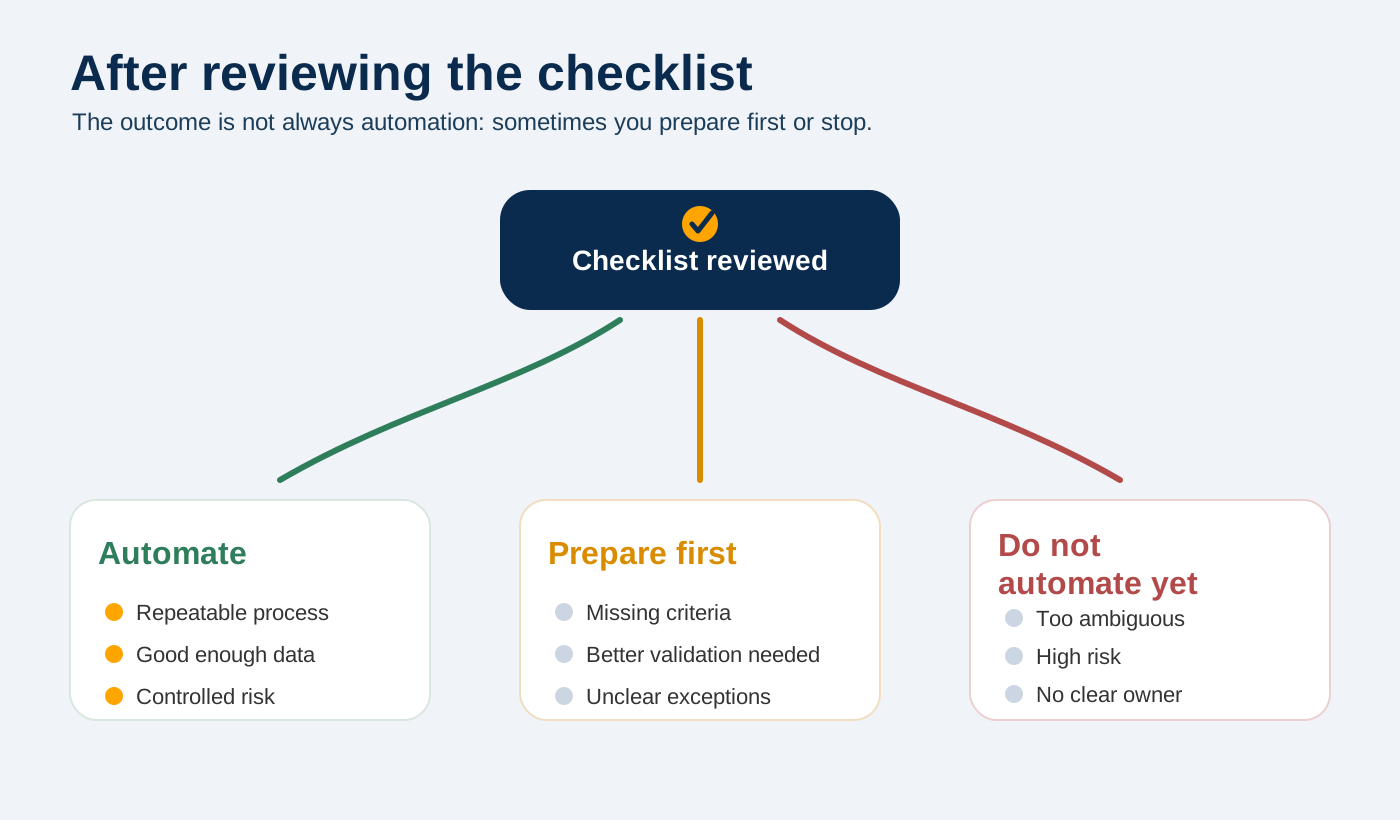
After reviewing the checklist, three possible decisions usually appear.
| Review result | Decision |
|---|---|
| The process is repeatable, the data is good enough, and the risk is controlled | Automate |
| There is clear value, but fields, criteria, or validations are missing | Prepare first |
| The process is too ambiguous, sensitive, or unreliable | Do not automate yet |
This decision matters more than the tool.
The best automation may be the one you do not build yet
There is an idea that is hard to defend when everyone wants to move fast: a good automation assessment does not always end with an automation.
Sometimes it ends with a clearer form, a cleaner CRM, a validation rule, human approval before a sensitive action, or an honest decision not to touch that process until it has more volume and fewer exceptions.
That is not moving slower. It is avoiding building on sand.
Automating well means knowing where the system can act on its own and where a person is still needed. The checklist does not answer that question for you, but it helps you not skip it.
If you have a process that looks like a good candidate but you are not sure whether it is ready, you can review the business process automation approach or start a conversation through contact.
But before choosing the tool, ask the question that prevents the most mistakes: is this process orderly enough that automating it will not scale the problem?