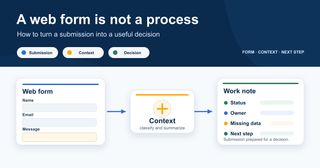
A web form is not a process
Many companies already have a form on their website.
Someone lands on the page, writes their name, leaves an email address, explains briefly what they need and clicks submit. From there, the system may do a few things: send a notification, create a record in the CRM, add a row to a spreadsheet or forward the message to a shared inbox.
At first glance, everything looks fairly organized: the form was submitted, the message arrived and maybe a record was even created in some tool.
But this is usually where the real problem begins.
Receiving a submission does not mean you have a process.
In practice, what I often see is this: the form works, the message arrives, the record is created… and the team still does not really know what to do next. Someone has to read the message, interpret it, decide whether it matters, think about what to reply, remember to follow up and, above all, make sure it does not get lost among other urgent tasks.
The problem is not technical. The form is doing its job.
The problem is operational: nobody has clearly defined what happens afterwards.
A form can collect data. But a process should help the team make decisions.
And this is where many automations start on the wrong foot. The form is connected to a tool, an alert is created, a card or record appears somewhere, and everyone assumes the problem has been solved. But if the team is still asking “who is handling this?”, “has anyone replied?” or “is this urgent?”, the form has only changed where the disorder accumulates.
Before asking which tool to connect, I would start with a simpler question:
what does the team need to know in order to turn this submission into a clear decision?
The problem is not the data. It is the lack of context
A typical form asks for a name, email, phone number, company and message.
That may be enough to contact someone. But it is not always enough to act well.
Imagine this message comes in:
“Hi, I’d like more information about your automation services.”
It is a valid submission. But it still says very little.
Is this a company or a freelancer? Is the need urgent or are they just exploring? Do they want to automate a specific process or do they not yet know where to start? Are they already using a CRM, an ERP, spreadsheets or manual email workflows? Are they looking for training, consulting or implementation? Do they have a timeline? Is someone in their team waiting for an answer?
If the system simply stores the message as it arrives, the important work is still manual. And I do not just mean writing a reply. I mean understanding what that submission actually represents.
This is where many forms fail: not because they ask for too little data, but because they do not help turn that data into context.
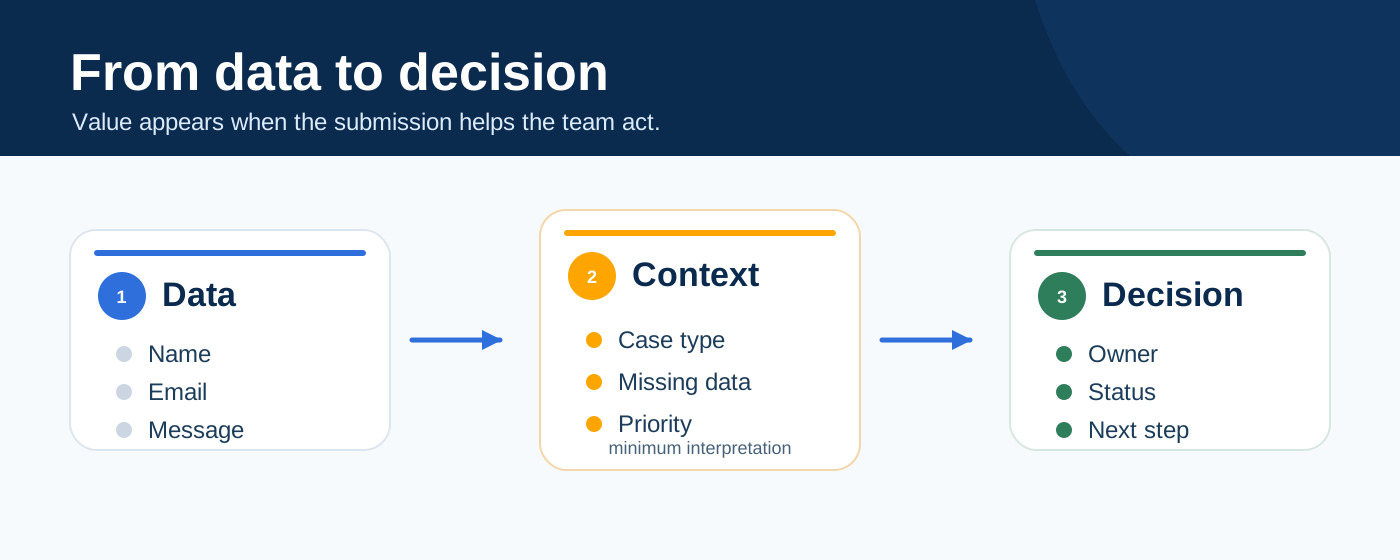
And without context, the team improvises.
One day someone replies very quickly. Another day the message stays pending. One person classifies it as an opportunity. Another sees it as a general inquiry. The CRM has the record, but nobody fully trusts the status. In the end, the real traceability goes back to email, chat or someone’s memory.
This is more common than it may seem.
Many opportunities are not lost because of price. They are lost because the reply comes too late, because it sounds too generic or because nobody turned that first message into a clear action.
The person has raised their hand. But the organization has not yet decided what to do with that raised hand.
A good form should start a chain of work
A form should not end when the user clicks “submit”.
It should start a small chain of work.
That chain does not need to be complex. In fact, the simpler it is at the beginning, the better. But it should organize the basic questions:
- what type of submission is this;
- what does this person seem to need;
- what information is missing;
- who should review it;
- what status should it have;
- what next step makes sense.
When this is not defined, the form becomes an inbox. And a full inbox is not a sales process, an operations process or a support process. It is simply a place where things pile up.
When the flow after the form is well designed, each submission can leave the form slightly better prepared:
- with an initial classification;
- with a useful summary;
- with a reasoned priority;
- with a clear status;
- with a person or team responsible;
- with a notification that provides context;
- and, when useful, with a first draft or suggested response.
This does not mean automating everything. It means the form stops being an isolated entry point and becomes part of a way of working.
A weak form says:
“Someone has submitted something.”
A form that is properly integrated into a process helps the team understand:
“This type of case has come in, it seems to need this, this information is missing, this person should review it and the recommended next step is this.”
That is a different level of usefulness.
That is operational context.
The six pieces that turn a submission into a decision
When I review a form or an intake flow, I do not start by checking whether it can be connected to a tool. It almost always can.
First, I look at whether the submission helps anyone make a decision.
There are six pieces that usually make the difference.
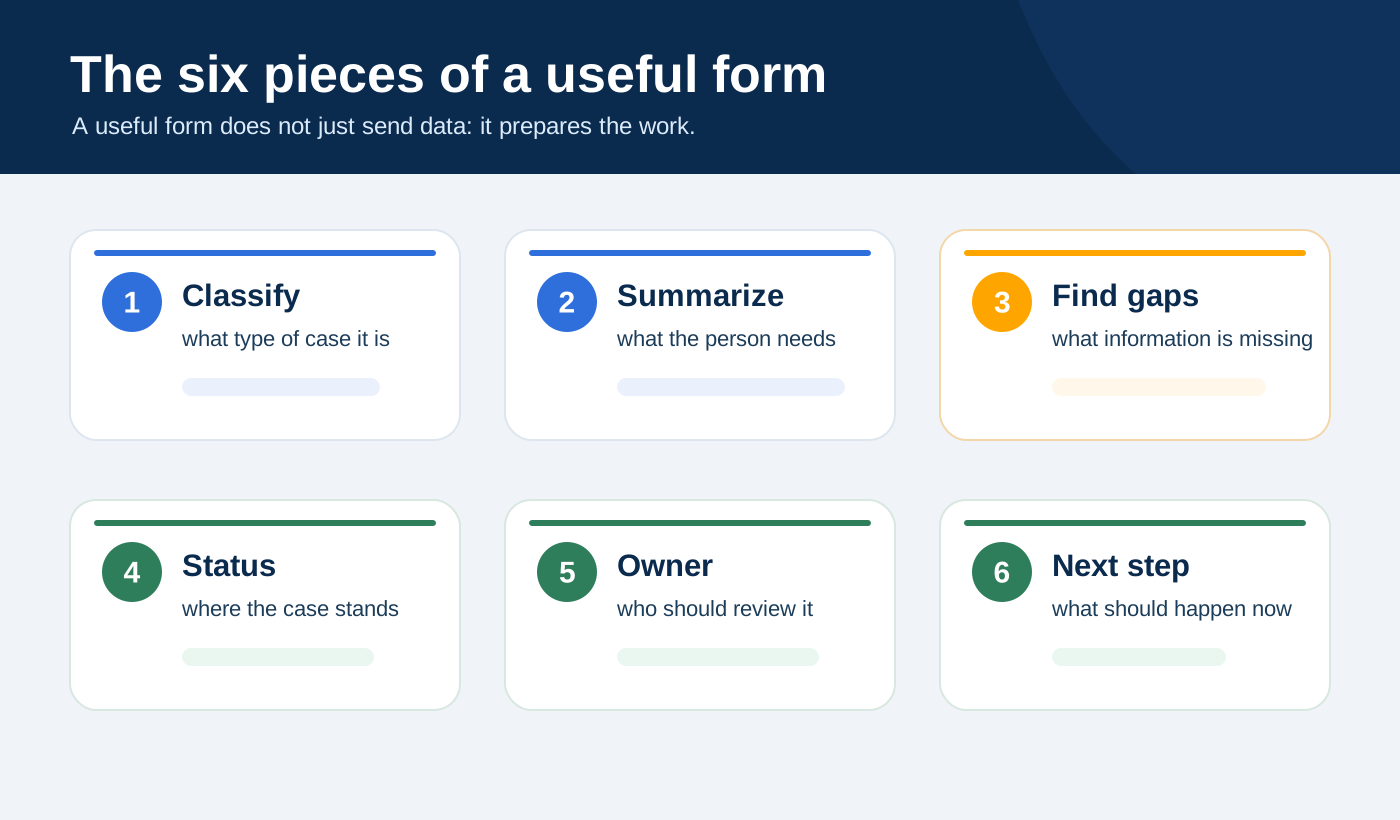
1. Classify the submission
Not every submission is the same.
The same page may receive a sales opportunity, a general question, a support request, a collaboration proposal, an unsolicited job application or a message that does not fit any service.
If everything comes in the same way, the team has to classify it manually every time.
And that work may look small, but it wears people down. Especially when it happens every week.
Classifying does not mean deciding everything. It means applying a first useful label:
- sales opportunity;
- general inquiry;
- urgent request;
- possible project;
- support or incident;
- not a fit;
- needs review.
This first classification already reduces a lot of noise. It means the team does not always have to start from zero.
2. Summarize the need
A message may be three lines long or thirty.
But the team needs to understand quickly what is going on.
A useful system should be able to generate a clear sentence such as:
“Small company that wants to reduce manual work in order management and is asking for initial guidance on automation.”
This summary does not replace the original message. It makes it easier to read.
This is useful when the person receiving the submission does not have time to read everything in depth right away, but still needs to decide whether to reply quickly, ask for more information or route it to someone else.
The first reading is invisible work. And in many teams, it is one of the most repeated tasks.
3. Detect missing information
Many forms do not fail because of what they ask. They fail because of what they do not ask.
Volume may be missing. Urgency may be missing. Budget, current tool, sector, team size, timeline, location, documentation or real examples may be missing.
And when an important piece of information is missing, the reply becomes weaker.
This is where AI can help a lot. Not by inventing information, but by pointing out the gap.
For example:
“It is not clear which process they want to automate or what monthly volume they have. Before proposing a solution, it would be useful to ask for two real examples and understand which tool they currently use.”
That is far more useful than a generic automatic reply.
Because it does not try to sell too early. It first organizes the conversation.
4. Assign an initial status
One of the most common problems with forms is that they come in, but they do not move forward.
The record exists, but it is not clear whether it is pending, assigned, replied to, discarded or waiting for more information.
That is why each submission should leave the form with an initial status. It does not need to be complicated. In a first version, it can be as simple as:
- new;
- pending review;
- needs more information;
- ready to reply;
- routed;
- discarded;
- urgent.
These statuses may seem minor, but they change the internal conversation.
When the status is clear, the team stops chasing information. Nobody has to ask every time whether someone has looked at it. The process starts to have memory.
And once a process has memory, it can be improved.
5. Notify the right person
Not every notification should go to the same place or carry the same level of urgency.
A general inquiry can wait for a normal review. A highly qualified lead needs a fast reply. An incident should go to support. A request that is not a fit may only need a short and polite response.
When everything arrives in the same channel, with the same format and the same apparent urgency, the team eventually deprioritizes everything.
A good automation does not just send notifications. It helps separate noise from what actually needs attention.
This is especially important in small companies or compact teams, where the same people handle sales, operations, administration and support. If everything arrives mixed together, the system does not help. It just interrupts more efficiently.
6. Suggest a next step
The important question after a form is not just “what did this person say?”.
It is:
what should happen now?
Maybe the next step is to reply with a question. Maybe it is to send a calendar link. Maybe it is to ask for documentation. Maybe it is to prepare a proposal. Maybe it is to route the case to someone else. Maybe it is to politely say that it is not a fit.
A useful system should help orient that next move.
It does not need to act on its own. But it should prepare the decision better.
This is where process and workflow automation stops being a simple connection between tools and starts adding operational judgment.
Where AI can help
AI can help a lot in this type of process, but not because it “replies by itself” to every form.
That is a fairly common mistake: treating AI as a final layer that writes an automatic response and that is it.
I would look at it differently.
AI can prepare an internal first reading so that a person can decide better and faster.
For example, after a form submission, it could generate a note like this:
Type of request: possible sales lead
Apparent need: wants to explore automation for an administrative process
Available context: small company, mentions invoices and manual emails
Missing data: monthly volume, current tool, urgency and specific goal
Suggested priority: medium
Risk or uncertainty: not enough information yet to estimate scope
Recommended next step: reply asking for 2-3 key details and offer a short first conversation
This note does not replace the person. It removes the first layer of interpretation.
And that changes the working experience.
Instead of opening an email, reading the message, interpreting it from scratch and deciding what to do, the person receives a prepared submission. They can review it, correct it and act.
AI can also detect inconsistencies. For example, if someone marks a request as “urgent” but says in the message that they are exploring options for next year. Or if they ask for a service the company does not offer. Or if an essential piece of information is missing before a serious answer can be given.
The value is not that AI sounds impressive.
The value is that it reduces friction without removing judgment.
Where it should not enter yet
Putting AI after a form does not fix a weak process.
If the form asks for very generic data, AI will work with poor information. If there are no clear categories, it will classify according to improvised criteria. If nobody knows what “urgent” means, the system will not know either. And if the CRM is already full of statuses nobody uses, adding more automation will make the disorder feel worse.
AI does not remove the need to define judgment. It makes that need more visible.
Before asking AI to classify form submissions, you need clarity on a few things:
- what types of submissions you want to distinguish;
- what minimum information is needed to act;
- who should review each type of case;
- what initial status each submission should have;
- when a response can be suggested;
- when human review is required;
- what happens if important information is missing;
- which cases you do not want to automate yet.
These questions may not sound spectacular. But they are what make automation hold up when it leaves the demo and enters the day-to-day reality of the team.
If you want to go deeper into this previous step, this checklist before automating a process may also help, because many automations fail precisely because this step is skipped.
Practical example: from form to useful internal note
Imagine a company that offers technical or professional services.
It has a contact form on its website with these fields:
- name;
- company;
- email;
- phone;
- message;
- service of interest.
So far, everything looks normal.
The usual process goes like this: an email arrives in a shared inbox and someone looks at it when they can. If it seems interesting, they reply. If information is missing, they improvise a question. If they do not have time, it stays pending. If someone else sees it later, they may not know whether anything has already been done.
This process works while there is little volume and a lot of informal memory.
But it does not scale.
Now imagine a slightly more mature version of the same process.
When the form is submitted, the system generates an internal note:
Entry point: web form
Type: possible project
Related service: process automation
Summary: company wants to reduce manual work in order and quote management
Available data: company, contact, general description of the problem
Missing data: monthly volume, current tools, real examples and timeline
Priority: medium-high
Suggested owner: sales / initial consulting
Status: needs more information
Next step: reply with specific questions and suggest a short conversation
This note can be saved in the CRM, Notion, Airtable, Google Sheets or whatever tool the company already uses. It can also be sent by email, Slack, Teams or Telegram.
The specific technology is not the point.
The point is that the submission no longer arrives as an open message. It arrives as a piece of work.
That enables three very concrete improvements.
The first is speed: the team understands sooner what is in front of them.
The second is consistency: similar submissions are treated in a similar way.
The third is follow-up: the case is not floating around, because it has a status, an owner and a next step.
When those three things happen, the form stops being an inbox and becomes the first step of a process.
The automatic reply is not always the first goal
When people talk about automating forms, they often think immediately about an automatic reply.
And that is understandable. Replying quickly matters.
But I would not always start there.
A poorly designed automatic reply can sound cold, too generic or too confident. It can also promise things that have not been validated yet. And if the form does not provide enough information, the risk of sending a weak or inappropriate response is high.
In many cases, the first goal should not be “reply automatically”.
The first goal should be “prepare the reply better”.
That may mean generating an internal draft that a person reviews before sending. Or proposing two possible replies depending on the type of case. Or simply pointing out which questions need to be asked before a good answer is possible.
For example:
“Before replying with a proposal, it would be useful to ask what monthly volume they handle, which tool they currently use and whether they can share real examples of documents or orders.”
This is not spectacular. But it is useful.
And very often, the automation that really helps is not the one that removes the person from the process. It is the one that helps the person arrive better prepared at the moment of decision.
How to know whether this process works
A form automation does not work just because the record is created correctly.
That only proves the technical connection is running.
The important test comes afterwards.
You can feel the change when the form stops being a source of interruptions and starts becoming a source of organized work. When the team opens the record and understands what happened. When nobody has to search through email to see whether someone replied. When important contacts are not mixed with generic inquiries. When the CRM stops being a warehouse and becomes a tool someone actually wants to open.
You do not need a huge metrics system to see this.
For two or three weeks, I would look at very simple signals.
The first is speed with meaning. Not only whether contacts receive a reply sooner, but whether that reply arrives with enough context. Replying quickly but poorly is not a real improvement.
The second is the quality of the first reading. Submissions should arrive better summarized, better classified and with less need for manual interpretation. If the team still has to read everything from scratch, the automation has not yet done its main job.
The third is traceability. Each case should have a clear status: new, pending, needs information, ready to reply, routed or discarded. If someone still has to ask in chat “what’s the status of this?”, the process is still too fragile.
The fourth is the reduction of internal interruptions. A good flow should reduce repeated questions, forwarded messages and small internal chases. If the automated form keeps generating the same noise, you have only changed the channel.
The fifth is the commercial quality of the response. Replies should sound less generic and more aligned with the case. Not because AI writes better, but because the team receives a better-prepared situation.
And the sixth is trust in the record. If the CRM, table or tool where the case is stored starts becoming the first place the team checks, that is a good sign. If everyone still looks for the truth in email or chat, the way of working has not really changed.
These signals say more than a perfect demo.
Because a demo only shows that the flow can work. The day-to-day reality shows whether the team has truly adopted it.
This connects with an idea I have discussed in other articles: an automation does not work just because it runs. It works when something real changes in the way the team operates.
In the case of a form, the change should be visible: fewer lost submissions, fewer internal doubts, faster response and more clarity about the next step.
A mini-checklist before touching tools
Before connecting the form to a CRM, AI or a larger automation, it is worth answering these questions.
About the submission
- What data do we currently ask for?
- What data is often missing?
- Are some questions too open?
- Does the form help us understand the real need?
- Are there fields users fill in but nobody uses afterwards?
About classification
- What types of submissions do we receive?
- Which categories are actually useful for deciding?
- Are there cases that do not fit?
- Who validates whether the classification is correct?
About the internal process
- Who receives each type of submission?
- What initial status will it have?
- How will we know whether it has already been answered?
- Where will follow-up be recorded?
- What happens if nobody replies within a certain time?
About AI
- What can it summarize or prepare?
- What should it not decide on its own?
- When should it flag missing information?
- When should it route the case to a person?
- How will we review whether its classifications are useful?
About the result
- What do we want to improve: time, quality, traceability, conversion or less manual work?
- How will we measure it during the first weeks?
- What would make us scale the process?
- What would make us adjust it?
- What would make us stop?
This checklist is not meant to slow the project down. It is meant to prevent an apparently simple automation from multiplying small confusions.
How I would start with a first pilot
I would not transform the whole sales process at once.
I would start with one form and one very specific objective.
For example:
“For two weeks, every contact form submission should generate an internal note with classification, summary, missing data, suggested priority and recommended next step.”
That is already a good pilot.
It does not need to reply automatically. It does not need to integrate with every tool. It does not need to make critical decisions.
It only needs to show whether the team understands contacts sooner, replies with better judgment and spends less time interpreting open-ended messages.
If it works, you can add a CRM integration. Then a smarter notification. Then a reply draft. Then routing rules depending on the type of case.
This order matters.
First context. Then automation. Then scaling.
If you start the other way around, you may end up building a sophisticated flow on top of a weak base.
Look at what happens in the first ten minutes
Before redesigning the whole process, I would review one very specific scene:
what happens during the first ten minutes after someone submits the form?
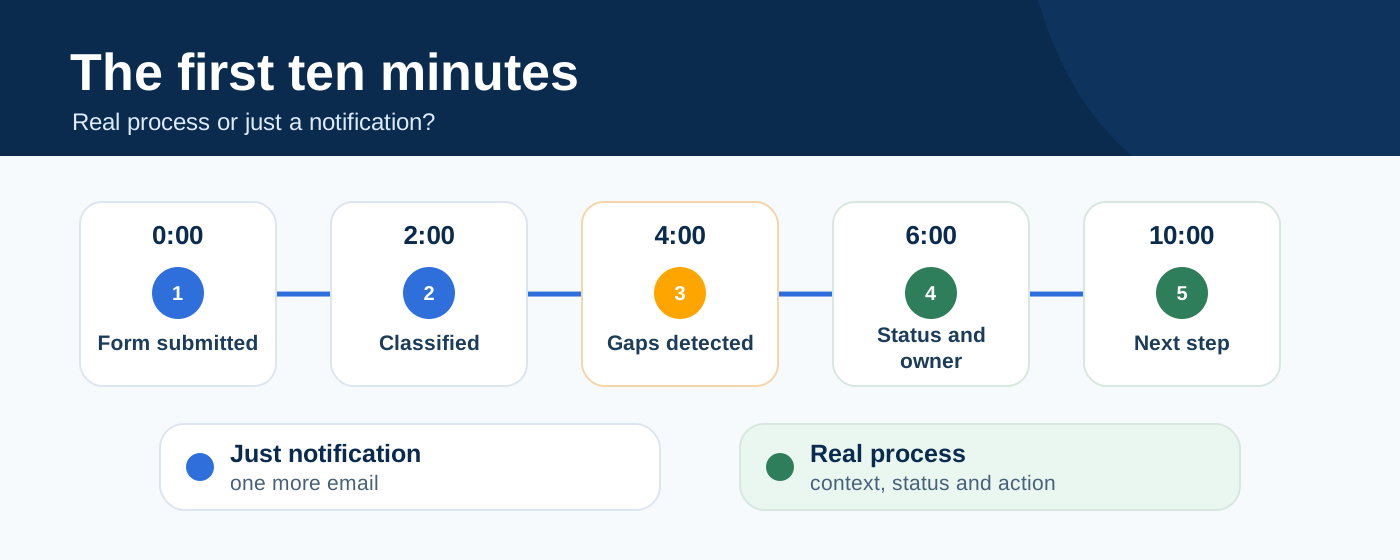
That window says a lot.
Who receives the alert? With what context? Can someone quickly tell whether it matters? Is the case recorded with a clear status? Is there an owner? Is the next step visible? Or does it simply become one more email in an already full inbox?
You do not need to audit the entire system to detect the problem. Often, it is enough to look honestly at those ten minutes.
If there are already doubts, delays or improvisation at that point, the problem is not the form. It is the process that comes after it.
And that is good news, because it gives you a very concrete place to start improving.
The challenge is not receiving more forms
A form should not be just an entry point.
It should be the first step of a decision.
When someone contacts a company, they are not just sending data. They are opening a possible conversation, an opportunity, an incident, a need or a question they may not yet know how to formulate clearly.
If the process after the form is weak, that submission fades away.
If the process is clear, the team can reply better, prioritize better and follow up with less effort.
That is why automating a form is not just about connecting applications. It is about turning scattered information into a clearer action.
The question I would ask is not:
“What happens when someone clicks submit?”
The important question is:
“What can your company actually do with what just arrived?”
If follow-up depends on who sees it first, whether someone has time or whether someone remembers to come back to it later, you do not yet have a process.
You have an inbox with good intentions.
And there is a very concrete opportunity there.
The first ten minutes after a form submission tell you whether you have a process or just a well-configured notification.
They decide whether that contact will be understood or merely recorded.
They decide whether the team will act with judgment or improvise.
They decide whether the form is just another inbox or the first step of a more reliable commercial process.
Sometimes, the best automation does not start by adding a new tool.
It starts by looking at an entry point you already have and asking, honestly, whether it is really helping the team make better decisions.
If you want to ground this in a real case, we can review the form and the process that comes after it.