Not everything that wastes time is ready to be automated
When a process becomes a burden, looking for a faster way to run it is natural. If a task repeats every week and makes the team copy data, review emails, classify requests or chase information, automation looks like the obvious answer. It often is.
But it is not always the first step.
Some processes waste time precisely because they are not defined well enough. They rely on implicit criteria, incomplete data, undocumented exceptions or decisions that only one person knows how to make. Automating too early does not remove the problem. It makes the problem move faster.
A form can create CRM records and AI can classify incoming requests. But if no one has defined what priority means, what happens when information is missing or who validates the result, the system turns disorder into something faster, less transparent and harder to correct.
The useful question is not only can we automate this process? It is is this process ready enough for automation to improve it without amplifying its problems?
If you are at an earlier stage, use this checklist before automating a process. If you already have a candidate, read how to choose your first AI pilot without losing months.
Automating too early is also a decision
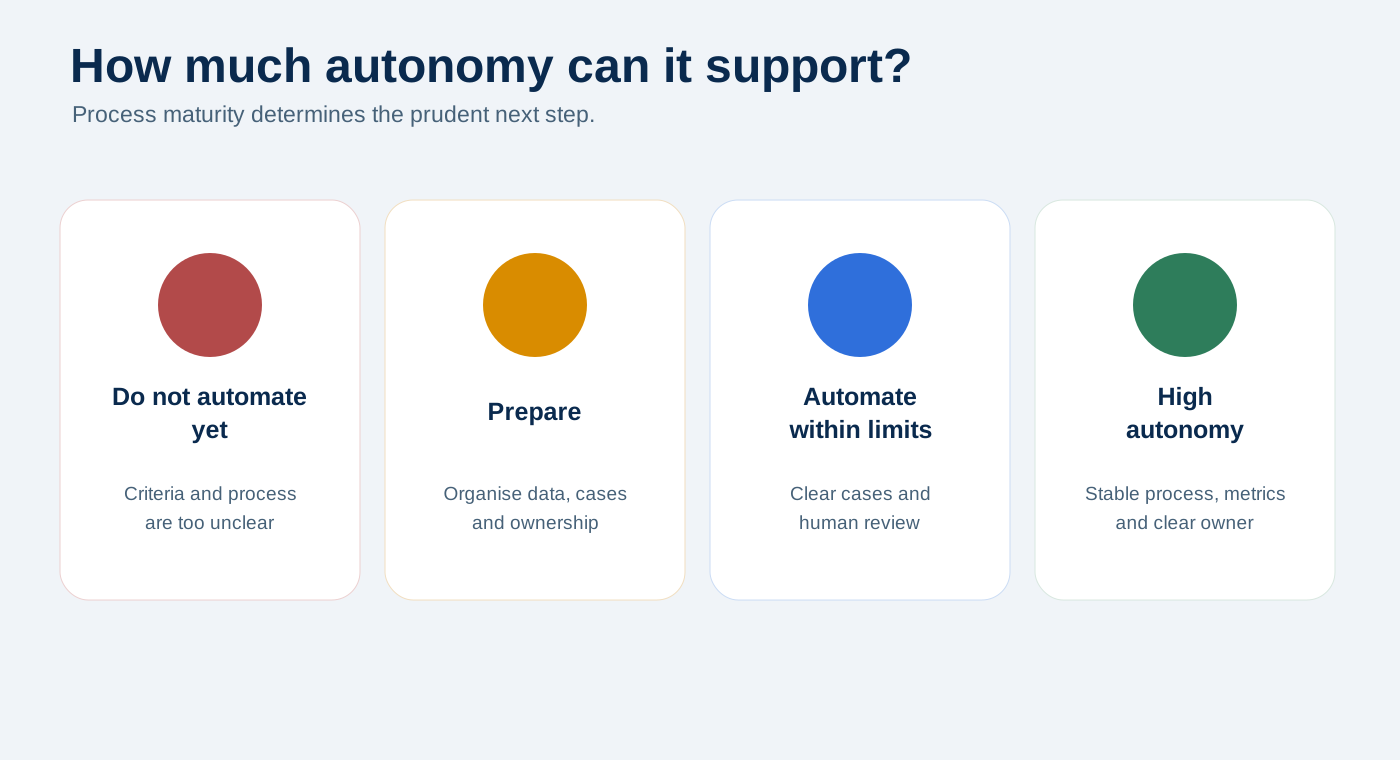
Choosing not to automate yet can be a highly professional decision, especially when it prevents you from building on a weak foundation.
Consider a sales process: leads arrive through the website, someone reviews them, decides whether they fit, responds, records a status and schedules a follow-up. In practice, grey areas appear: vague information, unclear priorities, different criteria and CRM statuses that are not kept up to date.
Connecting the form, summarising the message with AI and sending a notification may make a good demo. But the process still does not know what should happen next. This is one of the common process automation mistakes: focusing on the tool and forgetting the real workflow.
The first version could summarise the input, identify missing information, suggest a classification, assign a provisional status, alert a person and record why the system did not decide on its own. Mature automation can act; early-stage automation can prepare.
Sign 1: no one describes the process in the same way
Ask three people how the process works and you get three versions. Automation forces you to choose one. Choose the wrong one, and the workflow may function technically while failing to match the actual work.
Try writing down what triggers the process, what data comes in, who validates it, what decision is made, what action follows and where the result is recorded. If there is no agreement, first document the workflow you intend to build.
Sign 2: the real problem does not have a name yet
“It wastes our time” is still too broad. Time may be lost copying data, reviewing incomplete information, finding an owner or interpreting every request from scratch. These problems need different solutions.
Complete this sentence: we want to reduce [X] because it currently causes [Y]. Once the problem has a name, the automation has a direction.
Sign 3: decision criteria are implicit
Many processes work because one person knows how to interpret them. If that judgement is not documented, automation cannot apply it reliably. AI can summarise, classify and suggest, but it should not invent business criteria, even when its output sounds convincing.
“Qualified lead”, “urgent”, “enough information” and “low risk” are too open-ended to become a workflow directly. Define when to prioritise, request more data, escalate, reject, draft a response or stop the system.
Sign 4: the input data cannot support the process
If a process begins with incomplete, duplicate or unreliable data, everything downstream is affected. A web form is not a process; it is only the entry point.
Define which data is necessary and mandatory, what may remain free text, what must be standardised and what happens when critical information is missing. Sometimes the best first automation is changing two questions on a form.
Sign 5: exceptions are more common than the standard case
Exceptions are not the problem; unstructured exceptions are. Separate four groups: clear, incomplete, uncertain and out of scope. Automating the clear 40% well may be far better than filling a workflow with patches in an attempt to cover 100%.
Sign 6: the action carries too much risk to run unattended
Creating an internal task is not the same as emailing a customer, changing ERP data or publishing content. If an error is internal and reversible, the system can have more autonomy. If it affects customers, money, sensitive data or reputation, it needs more control.
AI can summarise without replying, draft without sending, flag a missing field without inventing it, or suggest a classification while escalating uncertain cases. The more visible, irreversible or sensitive the action, the more human review it needs at first.
Sign 7: there is no clear process owner
An automated process still needs someone who reviews errors, can stop the workflow, decides when criteria change and checks that it continues to deliver value. Without an owner, it can keep running technically while losing its operational purpose.
Sign 8: you do not know how you will tell whether it worked
Automation does not work simply because it runs. Define two or three indicators before building: time to first response, manual corrections, escalated cases, recurring errors, real adoption or cases without an owner.
To move beyond impressions, read how to tell if an automation is really working. Ask: in two or four weeks, what will we examine to decide whether this was worthwhile?
Sign 9: the current system is no longer trusted
A CRM, spreadsheet or shared inbox may exist while the important work happens elsewhere. Automation may feed a system the team already considers unreliable. The real question is which system will the team actually use when they are under pressure?
It is not a yes-or-no decision: it is an autonomy scale
| Level | What the system does | When it makes sense |
|---|---|---|
| 0. Document | Captures the process, criteria and exceptions. | When there is no agreement yet. |
| 1. Prepare | Summarises, organises and flags missing data. | When inputs vary. |
| 2. Propose | Classifies, suggests and prepares drafts. | When human review is still required. |
| 3. Assist with approval | Acts only after human approval. | When there is external impact or moderate risk. |
| 4. Act within limits | Handles clear cases and escalates exceptions. | When process, data and metrics are stable. |
| 5. Optimise | Records errors, reports and improves. | When there is real use, ownership and regular review. |
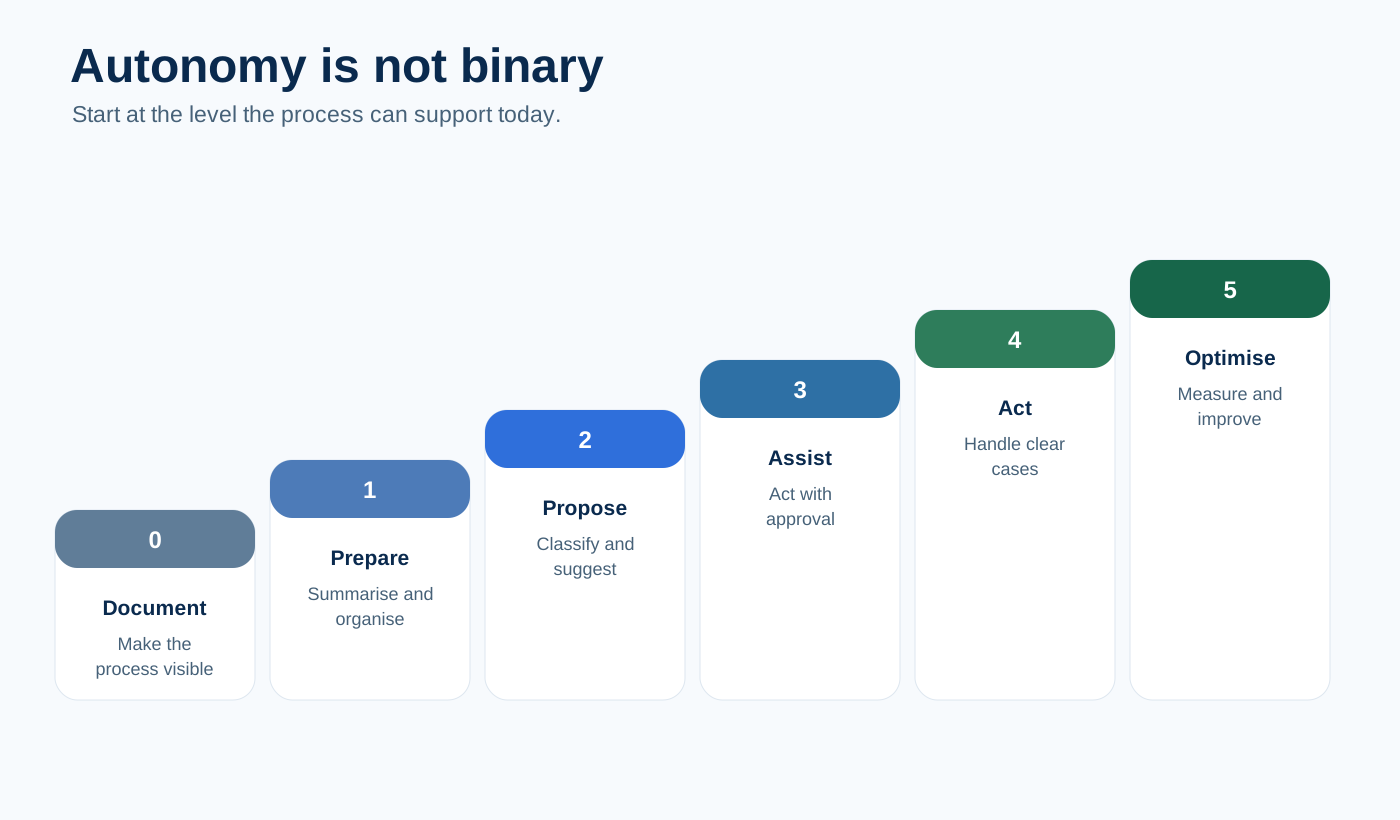
A process may not be ready for level 4, but it may be ready for level 1 or 2. The right decision is usually to match autonomy to process maturity.
The AI trap in immature processes
When conventional automation fails, it is usually visible. When AI fails because criteria are missing, the output may look correct while applying a decision the business has never made.
AI in a workflow should be able to say that it lacks enough information, human review is required, critical data is missing, two interpretations are possible or it can only prepare a draft. This does not make it less useful. It makes it more reliable.
What to do before automating
- Write down the real process
Document who receives, reads, copies, interprets and decides, where work gets blocked and where the outcome is recorded.
- Separate the cases
Classify them as clear, incomplete, uncertain and out of scope.
- Define the minimum data
Ask for what actually supports the decision, not everything you could collect.
- Write simple criteria
Define what happens when data is missing, there is external impact, no category fits or two classifications are possible.
- Start by helping before acting
In immature processes, summarise, organise, propose and escalate. The system does not need to decide alone.
- Record why the system does not act
The reasons will show whether you need to improve inputs, criteria or ownership.
- Schedule a short review
After two or four weeks, review volume, successful outcomes, escalations, errors, missing data and real adoption.
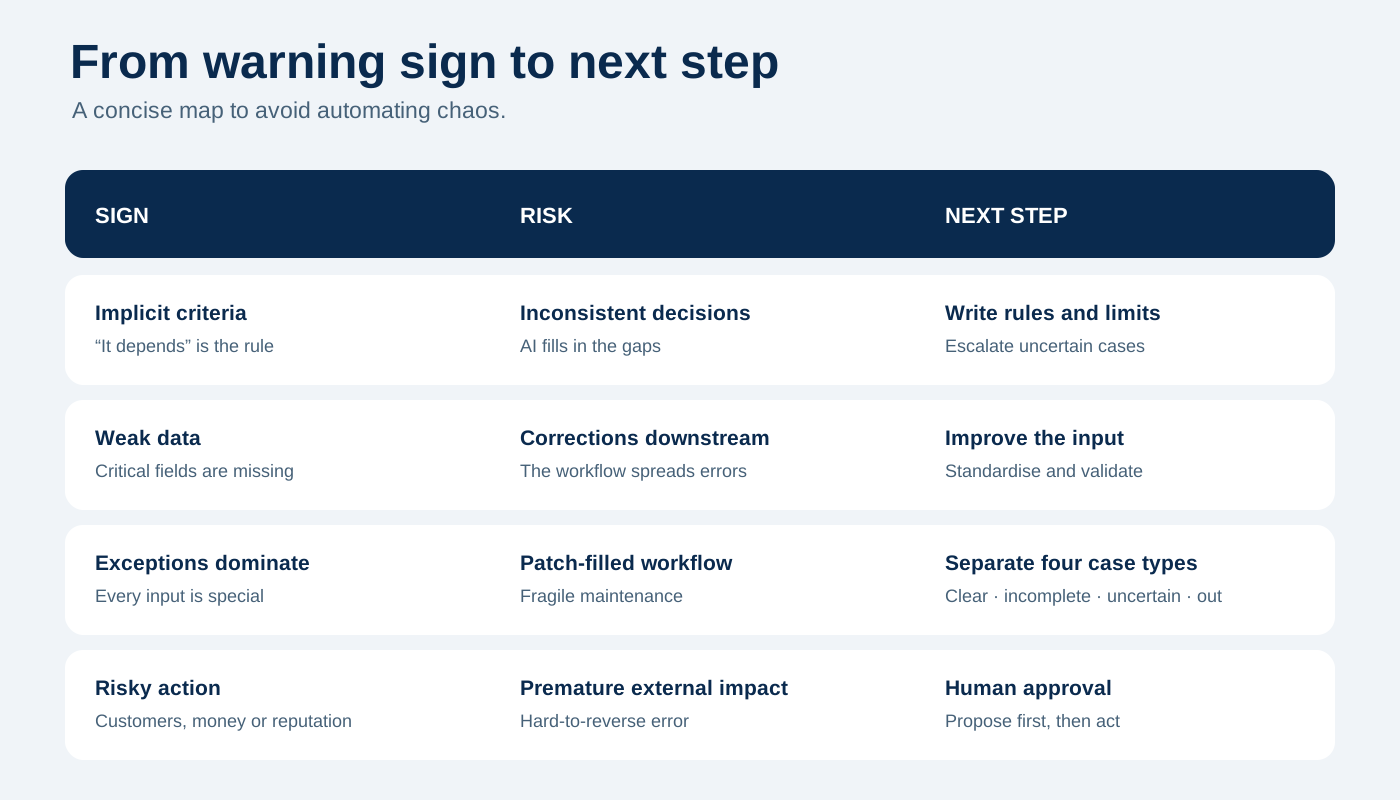
Quick decision table
| Sign | Risk of automating too early | Better step first |
|---|---|---|
| Different process versions | Partial workflow | Document and validate the real process |
| Broad problem | Impressive but unhelpful automation | Name the specific friction |
| Implicit criteria | Inconsistent decisions | Write decision and escalation rules |
| Weak data | More manual corrections | Improve fields and formats |
| Exceptions dominate | Patch-filled workflow | Separate the four case types |
| External action risk | Sending or changing too soon | Drafts and human approval |
| No owner | Obsolete workflow | Assign a process owner |
| No metric | Judging by impressions | Define 2-3 indicators |
| Untrusted system | Feeding a tool people avoid | Simplify its use before integrating |
When you can start
The point is not to delay automation, but to begin at the right level. You can detect incomplete fields, suggest classifications for approval, generate internal summaries, add provisional labels, escalate uncertain cases or schedule reminders. The first automation is often most useful when it helps a person decide better and faster.
A practical example: start without automating everything
A small company receives quote requests, support questions, administrative queries and orders through email and web forms. A prudent first version can gather requests, summarise them, detect missing data, classify the four case types, suggest a next step, create a human review task and record the criterion used.
It does not automate the final decision, but it stops the team starting from scratch and produces data about the process. It is better to learn this before building an automation that is too large.
Good automation prepares a process to withstand speed
Before automating, look for four things: clarity, input quality, control to stop or escalate and learning through measurement. You do not need perfection, but you should avoid building on confusion no one has addressed.
Closing thoughts
Not automating yet does not mean giving up. It is often what makes better automation possible later. Documenting the real workflow, defining criteria, separating cases, improving inputs, assigning an owner and planning the review creates a foundation that can handle more speed.
Do you want to automate but are unsure whether the process is ready?
We can review your case and identify the level of autonomy that makes sense now. See how we work, explore available solutions or get in touch.