The client had already replied. The reply had not been recorded.
An installation company sends a quote. A few days later, the client calls: the project is still going ahead, but they need to defer the decision by two weeks.
The sales representative remembers this. In the record, however, the quote is still marked as “sent”. A reminder comes due and the client receives an email asking whether they have had a chance to look at the proposal.
In this fictional example, the message arrives without taking account of a conversation that has already happened. The sales representative has to clear up the misunderstanding and update the follow-up.
Before automating quote follow-up, you need to be able to answer a question: what needs to happen with this offer now, who should do it, and what information do they need?
Some of this can be handled with simple rules. AI can help when a reply needs interpreting or context needs preparing for a person.
Be clear about what you are tracking
I would start by reviewing open quotes. For each one, I would need a reference that lets me find the client, the contact person and the version sent.
I would then add the owner, the current status, the last relevant interaction and the next action with a date. If the offer has a validity period, that should also be visible.
“Sent” only tells us what we did. It does not tell us whether the client is considering the proposal, waiting for a reply from us, or has asked us to get back to them later.
The next action needs to be specific: confirm a date, resolve a technical question, review a condition or resume contact on the agreed day. Writing “follow up” leaves too much to interpret.
This record can live in the CRM, the ERP or a shared table for an initial trial. You need to decide which is the reference point and how changes reach it. If a call changes the next step, someone needs to record that.
Every open quote should have an owner and a next step, even if that means waiting until an agreed date.
Make the status useful for decisions
Statuses are useful when they change what needs to happen. This table is a working proposal for the company in the example, adaptable to its sales process.
Scroll the table horizontally to see all four columns.
| Status | Signal | Next action | Owner |
|---|---|---|---|
| Awaiting a reply | The review date arrives with no updates recorded. | Check the context and decide whether contact is due. | Assigned sales representative. |
| Deferred to a date | The client asks to resume the conversation later. | Stop contact reminders and create a task for the agreed day. | Assigned sales representative. |
| Awaiting action from us | The client asks for clarification or a change. | Prepare the reply or review the offer before following up again. | Sales representative, with technical support if needed. |
| Validity expired | The offer’s validity period has elapsed. | Review the price, timeframe and terms before resuming it. | Person authorised to approve the offer. |
| Needs clarification | The reply is ambiguous or cannot be linked to a specific offer. | Pause outgoing messages and clarify which quote or condition it refers to. | Assigned sales representative. |
| Closed | Confirmed acceptance, rejection or a request not to continue. | Record the reason for closing, stop follow-up on this offer and start the next process according to that reason. | Assigned sales representative. |
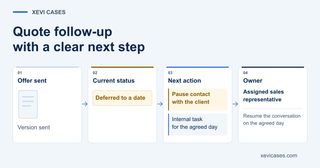
In the opening example, recording “deferred to a date” would have changed the flow: wait and notify the sales representative when it was time to resume the conversation.
If no one replies after the planned attempts, there also needs to be a review point. The person responsible will decide whether it makes sense to continue, defer or close the opportunity. A sequence should not repeat indefinitely because the record is still open.
- Offer sent Version sent
- Current status Deferred to a date
-
Next action
- Pause contact with the client
- Create an internal task for the agreed day
- Owner Assigned sales representative Resume the conversation on the agreed day
First automate the rules you can already explain
You do not need AI to interpret language to detect that a date has arrived, an owner is missing or an offer has expired.
With reliable data, you can define rules to create a task, flag an overdue deadline or detect open quotes with no next action. You should also avoid having the same review generate two tasks or two messages.
The first useful result might be a short list for the sales representative: what needs reviewing today, why, and where to find the context.
An automatic email to the client is an additional decision. Before enabling it, you need to specify the recipient, the offer version, the reason for contact, the attempt limit and the stop conditions.
The frequency should fit the process and the agreements with the client. If you have agreed to talk in two weeks, that agreement should govern the follow-up.
Reserve AI for context that is hard to interpret
AI can help read a reply, extract a request, summarise outstanding points or prepare a draft for the sales representative to review.
Suppose the client in the example writes: “It works for us, but we need to confirm that the installation can be done before the end of the month.”
Useful assistance would be to propose the status “awaiting action from us”, highlight the date condition and prepare a task to check availability. Marking the quote as accepted without resolving that condition would be premature.
To review the AI’s proposal, the sales representative needs to be able to see the original message and the offer it relates to. If there are several versions or quotes for the same client, a matching name is not enough.
I would keep human approval for changes involving prices, discounts, scope, timeframes or other commitments. AI can prepare a reply; the terms need to be confirmed by someone with the authority and information to do so.
If the main problem is sorting the whole inbox before reaching these cases, we cover that in the guide to automating email with AI. Here, the focus is the next step for a specific offer.
Also design when to stop
A new reply should trigger a review of the planned next step. So should a recorded call, a request to pause, a version change or an issue that prevents progress.
Detection depends on the integration. An automation that only checks email does not know about a phone conversation that no one has recorded.
Tools also have behaviours that need checking. For example, HubSpot lets you configure unenrolment from a sequence when a reply arrives, but documents exceptions in detecting out-of-office replies. The flow needs testing with the channels and situations the company will use.
If the updated status cannot be checked or it is unclear which offer a reply relates to, it is best to leave the case pending review and notify the owner.
Before a scheduled message is sent, you need to check again that contact is still due. The check made when the reminder was created may now be out of date.
If the client asks not to receive any more contact, that request needs to be recorded and prevent another sequence from contacting them automatically.
Test it with a limited group of quotes
I would start with a single type of offer, one owner and the tools the team already uses. Initially, the flow can propose tasks and drafts so that a person decides what to carry out.
Before putting it into use, I would test cases such as an offer with no reply, a deferral communicated by phone, a request for a change, an expired offer and the same quote processed twice. For each case, you need to know which action you expect and which should be avoided.
To assess the pilot, I would compare it with the starting situation:
- Coverage: how many open quotes have an owner and a dated next action.
- Timeliness: how many planned actions are reviewed within the agreed timeframe.
- Manual time: how much time is spent finding context and preparing follow-up, including reviewing the AI’s proposals.
- Follow-up errors: duplicates, contact at the wrong time or messages about the wrong version.
I would also look at won opportunities, but a sales improvement alone does not prove that automation caused it. The client mix, prices or volume of offers may have changed. To separate financial return from freed capacity, see the guide to the real ROI of AI automation.
In the opening example, the result we would look for is specific: the deferral is recorded, the client does not receive a reminder at the wrong time, and the sales representative resumes the conversation on the agreed day with the correct proposal in front of them.
Which quote needs action today?
If answering this question means going through emails, checking several lists and asking the team, there is a process we can review.
We can assess where follow-up gets lost and scope an initial trial with one type of quote, clear rules and human review where needed.