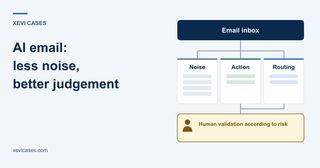
The problem is not receiving too many emails. It is having to review all of them
When a company says it receives too many emails, the problem is rarely just the volume.
The problem is that someone has to review each message to know what can be ignored, what needs action and what should be routed elsewhere.
The same inbox can contain newsletters, advertising, automated notifications, repetitive questions, incidents, sales opportunities, invoices, internal messages and cases that need context from other systems.
Some emails take seconds to resolve. Others require someone to look up information, forward the message, check an order, ask a colleague or leave a reply pending until later.
That is why the cost of email is not only the time spent replying. There is also the cost of interrupting what we are doing to decide what deserves attention.
The first benefit does not necessarily have to be faster replies. It can be much simpler: reducing the number of messages a person has to interpret before knowing whether any action is needed.
- Noise
- Action
- Routing
Automating email does not mean replying automatically
When we talk about AI applied to email, it is easy to imagine a system that reads a message and replies automatically.
That may be a destination for very specific cases, but it is not a good starting point.
A more useful way to think about the process is to separate four levels of responsibility:
understand → organise → prepare → act
- Understand
- Organise
- Prepare
- Act
Human validation according to risk
Understand means summarising a message, extracting the relevant information or identifying what it is about.
Organise means classifying, prioritising, tagging or routing it to the right person.
Prepare means proposing a reply or the next step without executing it yet.
And act is when the system sends a reply or changes data without prior review.
You do not need to reach the final step for automation to be useful. In many inboxes, understanding, organising and preparing already remove a meaningful amount of mechanical work.
Human validation is not a fifth level either. It is a control that can be placed before any action with enough consequence, ambiguity or risk.
The useful question becomes shorter:
“What can we delegate, and with what level of control?”
What to delegate first
The best initial candidates are tasks that consume attention but carry relatively low risk.
Separate noise
A newsletter, promotion or automated notification does not have the same operational value as a customer complaint or a request that needs a reply.
If a person no longer has to manually review messages that require no action, we have already saved time and, more importantly, attention.
Classify and route
You do not always need to reply to an email to create value.
Knowing whether it belongs to sales, administration, support or purchasing, and placing it in front of the right person, can remove forwarding, uncertainty and internal follow-up.
Prioritise with business criteria
“Urgent” does not always mean urgent.
An email without that word may matter much more if it comes from a recurring customer, relates to an open incident or affects a deadline the company has already committed to.
Prioritisation should therefore depend not only on keywords, but on the criteria the business has defined to decide what is genuinely important.
Prepare a reply
A good draft can remove a meaningful part of the work without removing the human decision.
The person still reviews the content and decides whether to send it, but they are no longer starting from a blank screen.
Automation can therefore be useful even if it never sends an email autonomously.
Where should human review happen?
Review should not always appear at the same point in the flow. It depends on what can happen if the system gets something wrong.
If AI classifies a message in the wrong category but the change is reversible and easy to spot, more autonomy may be acceptable.
If it is preparing a reply that will go out in the company’s name, the level of control changes. And if that reply includes a discount, a sensitive complaint, a delivery promise or any other commitment, the need for control increases again.
Review is also needed when the email itself does not provide enough information or is ambiguous. In those cases, the system should know how to stop or route the case; we will see how to apply that principle in concrete situations next.
This does not remove the saving.
If the person receives the message already classified, with context and a draft, the mechanical part of the process has already been reduced even if the final decision remains human.
The question is not whether a person stays in the loop, but what work that person still has to do and what work they no longer need to do.
What not to automate at the start
The greater the consequence of an error, the less sense it makes to start with maximum autonomy.
Sensitive replies, complex complaints, commercial commitments or cases where important information is missing are poor candidates for automatic sending at the beginning.
Ambiguous messages also deserve caution.
If a customer says “my order did not arrive properly”, we still do not know whether they mean the product, transport, quantity or an expectation that was not met.
In that situation, detecting the ambiguity and routing the message is better automation than forcing a reply.
The same principle applies when sensitive data is involved, money is at stake or a communication could create a contractual or reputational commitment.
These cases may support more automation over time. But autonomy should be justified by observed behaviour, not assumed from day one.
A practical case: from an overloaded inbox to a controlled pilot
Imagine a small company that sells products online and uses a customer service inbox.
It receives promotions and notifications that require no action, repetitive questions about products or deliveries, incidents and some cases that can only be resolved by checking order data.
Trying to solve everything from the start would mean defining many cases, connecting several systems and granting permissions before knowing whether classification and drafts already work well enough.
A first pilot could stay within the first three levels of the model: understand, organise and prepare.
Before anything is sent, a person reviews the draft.
The system identifies messages that require no action, classifies those that do, separates out-of-scope cases and prepares a reply only for a small set of repetitive queries with clear criteria.
At this stage there is no need to give access to the order system or allow automatic sending.
Even so, the pilot can already answer important questions: does classification reduce work? Do important messages reach the right person sooner? Are the drafts usable? Does the system know how to set aside cases it does not understand?
If that foundation works, expanding the scope makes sense. If it does not, we have found the problem before adding more integrations, permissions and dependencies.
- Understand
- Organise
- PrepareHuman review before anything is sent
- ActNo automatic sending
When you need more context than the email itself contains
The previous case also shows the limit of automation that only sees the inbox.
A question about product features or sizes may be answerable from stable information and a standard reply.
But if the same customer asks “where is my order?”, the email itself does not contain the answer. The real order status has to be checked in another system.
At that point we are no longer only managing email. We are starting to automate a business process that happens to begin with an email.
That may involve integrations with a CRM, ERP, ecommerce platform, ticketing system or other internal sources.
But every integration should answer a specific need.
The question is:
“What decision can we not make because this data is missing?”
If answering a delivery question requires the order status, the connection has a clear purpose.
If there is no concrete decision behind it yet, connecting more systems only adds complexity, permissions, maintenance and new failure points.
- Incoming email
- Decision to make
- Missing data
- Appropriate source
- CRM
- ERP
- Order system
- Ticketing system
How to tell whether the pilot is working
For our example company, we would not need twenty metrics. We would need enough evidence to decide whether to expand the pilot, adjust it or stop.
First, check whether the team is spending less time reviewing messages that require no action.
Then look at whether emails that do need a response reach the right category or person, and whether important cases stop getting buried in noise.
If the pilot prepares drafts, check whether they genuinely speed up the reply. They do not have to be perfect, but if every draft has to be almost completely rewritten, the system may be moving work rather than removing it.
Most importantly, observe errors with real impact: an important message misclassified, an incorrect priority, an unsuitable draft or a case where context was missing and the system should have stopped.
The goal is not to prove that AI is always right.
It is to check whether it reduces work without introducing enough risk or supervision to cancel out the benefit.
A matrix for deciding the level of control
Not every inbox task needs the same treatment.
A practical way to decide is to combine repetition, reversibility, the consequence of an error and the context available.
Scroll the table horizontally to see all columns.
| Situation | Recommended control | Example |
|---|---|---|
| Repetitive, reversible and low risk | Automate | Separate promotions or tag by team |
| Repetitive but consequential if wrong | Automate with validation | Draft a reply or route internally against a deadline |
| Ambiguous, sensitive or commitment-bearing | Human decision | Complex complaint or commercial commitment |
| Needs data the email does not contain | Look up or stop | Real order status |
This matrix does not replace understanding the process. It helps avoid one specific mistake: treating the whole inbox as if every message carried the same risk and required the same level of autonomy.
Fewer emails to review, not necessarily more automated emails
Good email automation can reduce noise, organise the inbox, surface important cases earlier and prepare the context or reply a person needs to make a decision.
In some processes it will also make sense to reach autonomous action, but that should not be the measure of success.
The main benefit is different: the team spends less attention figuring out what is noise and more attention on the cases where human judgement genuinely adds value.
Email is often the entry point to a wider workflow. The business process automation approach explains how to connect it with the tools and approval steps that follow.
Does your inbox need more automated replies, or simply less noise?
If email consumes time, creates interruptions or causes important messages to get buried, we can start with a short assessment to separate what is worth automating, what needs validation and what context is missing before more systems are connected.
If there is enough potential, the next step can be a limited pilot with human validation before automating more sensitive actions.