Three versions of the same procedure
Imagine a distribution company. A new warehouse employee wants to know where to log an issue with a delivery.
They find a procedure in a shared folder, an old copy attached to an email and an induction guide with different instructions. All three sources look credible. The person who knows which one is current is busy.
This is a fictional example, but it helps us see what we need to prepare before connecting documentation to an AI assistant. If all three versions remain available without distinguishing which one is current, we may get a clear answer based on the wrong instruction.
Preparation starts here: which questions do we want to answer, and which sources do we authorise for answering them?
If you are still assessing the fit, there is an introductory guide to when it makes sense to create an internal AI assistant. This article goes one step further: how to prepare an initial knowledge base without turning it into a never-ending project.
Start with recurring questions
I would start by collecting around ten real questions from one team. This is a rough guide to keep the first trial focused, not a technical minimum.
In the warehouse example, these might be: where to log an issue, what information to attach and who should review an exceptional case.
For each question, I would ask someone who knows the process what answer they consider correct and what it is based on. That answer will help us select the sources and, later, test the assistant.
This exercise also helps separate different needs. “Where do I find the procedure?” can be answered with documentation. “What is the status of this order right now?” requires up-to-date operational data. If the pilot only includes documents, this second case will need a separate integration.
Starting this way avoids uploading entire folders before knowing whether they contain what the team needs.
Make a small inventory of the sources you will actually use
For each selected document, it is useful to clarify a few details. These can be recorded in a simple table.
Scroll the table horizontally to see both columns.
| Field | What we need to clarify |
|---|---|
| Source and location | Where the original to be consulted is stored. |
| Question it answers | Which specific question from the team it helps answer. |
| Version and validity | Which version is approved and when it applies (e.g. v4 approved for warehouse receipts). |
| Owner | Who validates the content and resolves contradictions (e.g. the warehouse manager). |
| Access | Which user roles can consult this information. |
| Updates | How a change to the source will reach the assistant. |
If a document has no owner or we do not know whether it is still current, I would leave it pending validation before including it.
An old proposal, for example, may explain what was agreed with a customer. That does not automatically make it the commercial policy that applies today.
Resolve contradictions between sources
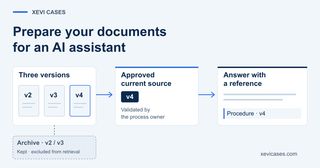
Let us return to the three versions of the procedure. Deciding which one is correct is the process owner’s responsibility.
Once it has been validated, we can make the current version available and exclude obsolete copies from the set of sources the assistant can consult. Old documents can be kept in the archive, labelled as historical, if the company needs them.
The file’s modification date alone does not settle this decision. An old copy that someone has saved again may have a more recent date than the approved procedure.
We may also discover that only one person knows the answer. In that case, it helps to capture their guidance in a short note: when it applies, a typical example, an exception and who has validated it. When a case still calls for expert judgement, the documentation should make clear who to consult.
You do not need to document everything. You need to clarify what the first answers will depend on.
-
Three versions
- v2
- v3
- v4
Archive · v2 / v3 Kept and excluded from retrieval - Approved current source v4 Validated by the process owner
- Answer with a reference Procedure · v4
Check that the content can be read with enough context
A document that works for a person may cause problems when the system extracts its content.
Think of a table where a condition only appears in the header, a scanned PDF with poorly recognised text, or an instruction that says “in this case” and depends on the preceding paragraph. If that relationship is lost, the interpretation may change.
During preparation, we need to check that the system retains enough context: headings, steps, conditions, units and references. Reading problems should be corrected or left out of the first trial.
In many assistants, a technique called RAG makes it possible to search for information and provide it to the model so it can compose an answer. The quality of that retrieval depends, among other factors, on how the content has been prepared and divided. Connecting the files is only part of the work.
Define who can consult each source
The fact that the assistant can access a folder does not mean every user should be able to consult its contents.
We need to define the authorised user roles and validate how those limits are applied in the specific integration. An instruction written for the model does not replace access control on the sources.
For an initial pilot, we can limit the scope to one team and a set of sources that everyone on that team is authorised to consult. If that is not possible, separating permissions is part of the scope that needs to be addressed before opening up access.
Test the answers with cases you already know
The initial questions now serve as a basis for testing. The person validating the answers must be able to check them against the approved procedure.
Alongside typical cases, I would include these situations:
Scroll the table horizontally to see both columns.
| Test situation | What we want to check |
|---|---|
| The answer is in the current source | The assistant applies the correct conditions and allows the answer to be checked. |
| The question is ambiguous | It asks for the necessary context before giving an instruction. |
| The answer is not documented | It indicates that there is not enough information and points to the designated owner, if there is one. |
| The user’s role has no access to the source | Restricted information is neither retrieved nor included in the answer. |
An answer with a citation still needs to be reviewed: the document may be outdated or may not support what was said. And passing a few test cases does not prove that the system will never make a mistake.
When there is an error, it is useful to distinguish the cause. Information may be missing from the source, the wrong passage may have been retrieved, or a condition may have been misinterpreted. Each problem calls for a different correction.
Plan for updates
Before expanding the pilot, we need to know what will happen when a procedure changes.
Who approves the new version? How is the previous one removed from the set of sources the assistant can consult? When does the change appear in the assistant? Who checks that the affected questions are still answered correctly?
The review frequency will depend on how much the information changes and the consequences of an incorrect answer. The test questions can be kept so this check can be repeated after changes.
In the opening example, the first useful result would be very specific: the new employee finds the current instruction, understands where to log the issue and knows who to turn to if their case does not fit.
You can start with this scope. One team, a few recurring questions and the sources needed to answer them.
Where would I start in your company?
If you have recurring questions and scattered documentation, we can review which questions are worth covering, which sources can be used and what is missing to prepare a pilot.